
When creating a Custom Role, several permissions must be considered, as they directly impact what a User assigned to the Role can and cannot do. Below is a breakdown of each permission, categorized by each tab that they are located on within Empeon Workforce.
Dashboard
All permissions within this tab relate to features located within the Dashboard tab of Empeon Workforce.
| Permission | Description | Permission Structure |
| View payroll data | Controls whether the User can view the Current Payroll widget on the Home Dashboard. Please note that if the Access Payroll permission is enabled, the Current Payroll widget will be visible regardless of whether this permission is enabled or not. |
 No Access or Full Access |
People
All permissions within this tab relate to features located within the People tab of Empeon Workforce.
Employee Management
| Permission | Description | Permission Structure |
| Add employee | Controls whether the User can manually add new employees into the system. |
|
| Add Staffing Agency Employee | Controls whether the User can manually add new agency employees into the system. |
|
| Import employees |
Controls whether the User can import new employees into the system. If enabled, the Company Customization permission determines whether the user can create or modify Employee Import configurations. |
No Access or Full Access |
| Delete employee | Controls whether the User can delete employees that have already been set up within the system. | No Access or Full Access |
| View Employee Documents | Controls whether the User can view documents attached to cards within the employee profile. Users can only view documents attached to cards that they have permission to access. If access to a specific card is turned off, any documents attached to that card will not be visible. |
|
HR
| Permission | Description | Permission Structure |
| Edit employee info |
Controls whether the User can edit information within the following employee profile cards:
|
No Access or Full Access |
| View SSN | Controls whether the Social Security Number for each employee the User has access to is visible or not. | No Access or Full Access |
| View DOB | Controls whether the Date of Birth for each employee the User has access to is visible or not. | No Access or Full Access |
| Emergency Contacts | Controls the User’s access level to the Emergency Contact card within the employee profile. |  No Access, View only, View & Edit, or Full Access |
| Medical Records | Controls the User’s access level to the Medical Records card within the employee profile. | No Access, View only, View & Edit, or Full Access |
| Prior Employment | Controls the User’s access level to the Prior Employment card within the employee profile. | No Access, View only, View & Edit, or Full Access |
| Employment Status | Controls the User’s access level to the Employment Status card within the employee profile. Granting Full Access to this permission will allow the User to place an employee on leave or terminate their employment. |
No Access, View only, View & Edit, or Full Access |
| ACA Type | Controls the User’s access level to the ACA Type card within the employee profile. | No Access, View only, View & Edit, or Full Access |
| Job Info | Controls the User’s access level to the Job Info card within the employee profile. | No Access, View only, View & Edit, or Full Access |
| Approved To Work | Controls the User’s access level to the Approved To Work card within the employee profile. | No Access, View only, View & Edit, or Full Access |
| Reviews | Controls the User’s access level to the Reviews card within the employee profile. | No Access, View only, View & Edit, or Full Access |
| Events | Controls the User’s access level to the Events card within the employee profile. | No Access, View only, View & Edit, or Full Access |
| Licenses/Certificates | Controls the User’s access level to the Licenses & Certificates card within the employee profile. | No Access, View only, View & Edit, or Full Access |
| Driver's License | Controls the User’s access level to the Driver's Licenses card within the employee profile. | No Access, View only, View & Edit, or Full Access |
| Trainings |
Controls the User’s access level to the Trainings card within the employee profile. |
No Access, View only, View & Edit, or Full Access |
| Education |
Controls the User’s access level to the Education card within the employee profile. |
No Access, View only, View & Edit, or Full Access |
| Skills | Controls the User’s access level to the Skills card within the employee profile. | No Access, View only, View & Edit, or Full Access |
| Company Assets | Controls the User’s access level to the Company Assets card within the employee profile. | No Access, View only, View & Edit, or Full Access |
| Vehicles | Controls the User’s access level to the Vehicles card within the employee profile. | No Access, View only, View & Edit, or Full Access |
| Custom Fields | Controls the User’s access level to the Custom Fields card within the employee profile. | No Access, View only, View & Edit, or Full Access |
| Workplace Incidents | Controls the User’s access level to the Workplace Incidents card within the employee profile. | No Access, View only, View & Edit, or Full Access |
Payroll
| Permission | Description | Permission Structure |
| Pay Info | Controls the User’s access level to the Pay Info card within the employee profile. | No Access, View only, View & Edit, or Full Access |
| Allow Default Rate outside of Wage Scale | Controls whether the User can add or edit a rate that would be outside of an established Wage Scale. This permission only applies if the Pay Info permission is enabled. |
No Access or Full Access |
| Additional Rates | Controls the User’s access level to the Additional Rates card within the employee profile. | No Access, View only, View & Edit, or Full Access |
| Request Rate Change | Controls whether the User can request a rate change for an employee This permission only applies if the Pay Info permission is enabled. |
No Access or Full Access |
| Deductions | Controls the User’s access level to the Deductions card within the employee profile. | No Access, View only, View & Edit, or Full Access |
| Direct Deposits | Controls the User’s access level to the Direct Deposit card within the employee profile. | No Access, View only, View & Edit, or Full Access |
| Direct Deposits - View Full Account Number | Controls whether the User can view the full account number of direct deposit accounts that are set up within the employee profile. Otherwise it will only display the last four numbers of the account. This permission only applies if the Direct Deposits permission is set to "View only". |
No Access or Full Access |
| Taxes | Controls the User’s access level to the Taxes card within the employee profile. | No Access, View only, View & Edit, or Full Access |
| Auto Pays | Controls the User’s access level to the Auto Pays card within the employee profile. | No Access, View only, View & Edit, or Full Access |
| Labor Allocation | Controls the User’s access level to the Labor Allocation card within the employee profile. | No Access, View only, View & Edit, or Full Access |
| Check Shipping | Controls the User’s access level to the Check Shipping card within the employee profile. | No Access, View only, View & Edit, or Full Access |
| View first/last pay date | Controls whether the User can view the employee's Last Pay Date, which is located in the top right corner of the employee profile, regardless of what section of the profile is selected. | No Access or Full Access |
| Manual Check |
Controls whether the User can initiate a manual check for employees they have access to. |
No Access or Full Access |
| Save manual check | Controls whether the User can create and save a manual check to the VM batch for each employee they have access to. | No Access or Full Access |
| Print manual check |
Controls whether the User can print a manual check after being able to create and save it to the VM batch. In order to print a manual check, the permissions for Manual check and Save manual check should also be enabled. |
No Access or Full Access |
| Print signature on manual checks | Controls whether a check signature associated with the bank account used to pay the manual check will be printed on the manual check or not. | No Access or Full Access |
| Pay History | Controls whether the User can view Pay History details for each employee they have access to. | No Access or Full Access |
| Void check |
Controls whether the User can initiate a void for each employee they have access to. In order to initiate a void, the Pay History permission must be enabled. |
No Access or Full Access |
| Void & Reissue check |
Controls whether the User can initiate a void and reissue for each employee they have access to. In order to initiate a void, the Pay History permission must be enabled. |
No Access or Full Access |
| Reprint check |
Controls whether the User can reprint a check for each employee they have access to. In order to initiate a void, the Pay History permission must be enabled. |
No Access or Full Access |
Benefits
| Permission | Description | Permission Structure |
| Accruals | Controls the User’s access level to the Accruals card within the employee profile. | No Access, View only, View & Edit, or Full Access |
| Dependents | Controls the User’s access level to the Dependents card within the employee profile. | No Access, View only, View & Edit, or Full Access |
| Fringe | Controls the User’s access level to the Fringe Benefits card within the employee profile. | No Access, View only, View & Edit, or Full Access |
| Insurance | Controls the User’s access level to the Insurance card within the employee profile. | No Access, View only, View & Edit, or Full Access |
| Benefits Enrollment | Controls the User’s access level to the Benefits Enrollments card within the employee profile. | No Access, View only, View & Edit, or Full Access |
Attendance
| Description | Description | Permission Structure |
| Clock Settings | Controls the User’s access level to the Clock Settings card within the employee profile. | No Access, View only, View & Edit, or Full Access |
| Punch Location Filters | Controls the User’s access level to the Punch Location Filters card within the employee profile. | No Access, View only, View & Edit, or Full Access |
| Schedule Pattern | Controls the User’s access level to the Schedule Pattern card within the employee profile. | No Access, View only, View & Edit, or Full Access |
| Schedule | Controls the User’s access level to the employee's Schedule within the employee profile. | No Access, View only, View & Edit, or Full Access |
| Time Card |
Controls the User’s access level to the employee's Time Card within the employee profile. If this permission is set to "View & Edit" or "Full access", Users will be able to:
|
No Access, View only, View & Edit, or Full Access |
| Allow Edit of Non-Manual Punches |
Controls whether the User can edit non-manual punches on the time card. If disabled, Users can only edit manual punches. Please note that the Time Card permission needs to be set to either "View & Edit" or "Full access" for this permission to apply properly. |
No Access or Full Access |
| Allow Override Pay Record |
Controls whether the User can enter pay record overrides for a set of punches on the time card. Please note that the Time Card permission needs to be set to either "View & Edit" or "Full access" for this permission to apply properly. |
No Access or Full Access |
| Time Card Manual Pay |
Controls the User’s access level to enter manual pay items on an employee's time card. Please note that the Time Card permission needs to be set to either "View & Edit" or "Full access" for this permission to apply properly. |
No Access, View only, View & Edit, or Full Access |
| Allow Negative Time Off Request |
Controls whether the User can request time off on the time card that would place the employee at a negative accrual balance. Please note that the Time Card permission needs to be set to either "View & Edit" or "Full access" for this permission to apply properly. |
No Access or Full Access |
| Time Card Approve Unpaid Hours |
Controls the User’s access level to review and approve unpaid hours on an employee's time card. Please note that the Time Card permission needs to be set to "View only" or above for this permission to apply properly. |
No Access, View only, View & Edit, or Full Access |
| Approve Time Card |
Controls whether the User can approve time cards for each employee they have access to. Please note that the Time Card permission needs to be set to "View only" or above for this permission to apply properly. |
No Access or Full Access |
| Adjust closed time card |
Controls whether the User can adjust time cards that have been closed and include the adjustments in payroll or not. Please note that the Time Card permission needs to be set to either "View & Edit" or "Full access" for this permission to apply properly. |
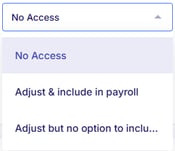 No Access, Adjust & include in payroll (Full access), or Adjust but no option to include in payroll (Partial access) |
Onboarding
| Permission |
Description |
Permission Structure |
| Access onboarding |
Controls whether the User can access the Onboarding section within the People tab. This includes access to be able to send an onboarding template to an employee. The ability to add and edit Onboarding Templates is controlled by the Onboarding Setup permission. |
No Access or Full Access |
| Approve new hire |
Controls whether the User can approve new hires who have completed their Onboarding Template within the Onboarding section of the People tab. The Access onboarding permission must be turned for this permission to apply properly. |
No Access or Full Access |
| Cancel onboarding |
Controls whether the User can cancel/delete onboarding templates that have already been sent. The Access onboarding permission must be turned for this permission to apply properly. |
No Access or Full Access |
Actions
All permissions within this tab relate to features located within the Actions tab of Empeon Workforce.
HR
| Permission | Description | Permission Structure |
| E-Verify | Controls whether the User can access the E-Verify Dashboard located within the HR section of the Actions tab. |
|
Payroll
| Permission | Description | Permission Structure |
| Access Payroll |
Controls whether the User can access payroll which includes the ability to:
|
|
| Approve Audits |
Controls whether the User can approve payroll audits flagged during the payroll process. The Access Payroll permission must be turned for this permission to apply properly. |
No Access or Full Access |
| Submit Payroll |
Controls whether the User can submit payroll. The Access Payroll permission must be turned for this permission to apply properly. |
No Access or Full Access |
Attendance
| Permission | Description | Permission Structure |
| Access Attendance | Controls whether the User can access Time Sheet Processing, located within the Attendance section of the Actions tab. | No Access or Full Access |
| Time Sheet - Punch Review |
Controls whether the User can review punches within Time Sheet Processing. The Access Attendance permission must be turned for this permission to apply properly. |
No Access or Full Access |
| Time Sheet - Import Punches |
Controls whether the User can import punches within Time Sheet Processing. The Access Attendance permission must be turned for this permission to apply properly. |
No Access or Full Access |
| Time Sheet - Verification |
Controls whether the User can verify punches within Time Sheet Processing. The Access Attendance permission must be turned for this permission to apply properly. If time card approval is required in the company’s Attendance Settings, the Approve Time Card permission may also need to be enabled for the User to manage unapproved time cards during this step. |
No Access or Full Access |
| Time Sheet - Audits |
Controls whether the User can review and approve attendance audits within Time Sheet Processing. The Access Attendance permission must be turned for this permission to apply properly. |
No Access or Full Access |
| Time Sheet - Submit and Close |
Controls whether the User can close and submit time cards within Time Sheet Processing. The Access Attendance permission must be turned for this permission to apply properly. |
No Access or Full Access |
| PBJ Processing | Controls whether the User can access PBJ Processing, located within the Attendance section of the Actions tab. | No Access or Full Access |
| Request Bonus | Controls whether the User can request bonuses on time cards for each employee they have access to. | No Access or Full Access |
| Approve Bonus | Controls whether the User can approve bonuses that have been requested on time cards for each employee they have access to. | No Access or Full Access |
Scheduling
| Permission | Description | Permission Structure |
| Scheduling |
Controls the User’s access level to the Scheduling feature. If this permission includes access to:
|
No Access, View only, View & Edit, or Full Access |
| Update Census |
Controls whether the User can update the census. Please note that the Scheduling permission needs to be set to either "View & Edit" or "Full access" for this permission to apply properly. |
No Access or Full Access |
| Update Additional Shifts |
Controls whether the User can add additional shifts to the schedule. Please note that the Scheduling permission needs to be set to either "View & Edit" or "Full access" for this permission to apply properly. |
No Access or Full Access |
Benefits
| Permission | Description | Permission Structure |
| ACA Dashboard | Controls whether the User can access the ACA Dashboard. | No Access or Full Access |
| Open Enrollment | Controls whether the User can view, facilitate and manage open enrollment sessions. | No Access or Full Access |
Talent Acquisition
| Permission | Description | Permission Structure |
| Talent Acquisition Portal | Controls whether the User can access the Talent Acquisition Portal. | No Access or Full Access |
Requests
| Permission | Description | Permission Structure |
| Review PTO request | Controls whether the User can review Time Off (PTO) requests for each employee they have access to. | No Access or Full Access |
| Review Missed Punch request | Controls whether the User can review Missed Punch requests for each employee they have access to. | No Access or Full Access |
| Review Waive Meal request | Controls whether the User can review Waive Meal requests for each employee they have access to. | No Access or Full Access |
| Review Rate Change request | Controls whether the User can review Rate Change requests for each employee they have access to. | No Access or Full Access |
| Review Reimbursement request | Controls whether the User can review Reimbursement requests for each employee they have access to. | No Access or Full Access |
Share
| Permission | Description | Permission Structure |
| Documents |
Controls the User’s access level to the Document share feature. Setting this permission to "View only" will allow the User to see all documents that have been shared and their results. Setting this permission to "View & Edit" or higher will allow the user to also share documents. |
No Access, View only, View & Edit, or Full Access |
| Paths |
Controls the User’s access level to the Path share feature. Setting this permission to "View only" will allow the User to see all Paths that have been shared and their results. Setting this permission to "View & Edit" or higher will allow the user to also share Paths. |
No Access, View only, View & Edit, or Full Access |
Engage
| Permission | Description | Permission Structure |
| ESS Announcements |
Controls the User’s access level to the ESS Announcements feature. Setting this permission to "View only" will allow the User to see all announcements that have been shared and their results. Setting this permission to "View & Edit" or higher will allow the user to also create and share ESS announcements. |
No Access, View only, View & Edit, or Full Access |
| Create Surveys | Controls the User’s access level to create ESS Surveys. | No Access, View only, View & Edit, or Full Access |
| Share Surveys | Controls the User’s access level to share ESS Surveys. | No Access, View only, View & Edit, or Full Access |
Reports
All permissions within this tab relate to features located within the Reports tab of Empeon Workforce.
Reports
| Permission | Description | Permission Structure |
| Attendance reports | Controls whether the User can access reports relating to time and attendance. This includes standard and live reports, with the exception of the Employee Clock Enrolled live report. | No Access or Full Access |
| View payroll summary | Controls whether the User can access the Payroll Summary standard report. | No Access or Full Access |
| View payroll invoice | Controls whether the User can access the Invoice standard report. | No Access or Full Access |
| All Other reports | Controls whether the User can access all other standard reports. | No Access or Full Access |
File Room
| Permission | Description | Permission Structure |
| Access file room | Controls whether the User can access the File Room. | No Access or Full Access |
| View checks |
Controls whether the User can access the Checks report generated in the File Room. The Access file room permission must be turned for this permission to apply properly. |
No Access or Full Access |
| View tax forms |
Controls whether the User can access the tax forms generated in the File Room. The Access file room permission must be turned for this permission to apply properly. |
No Access or Full Access |
Finance
| Permission | Description | Permission Structure |
| Bank Register | Controls whether the User can access the Bank Register within the Finance section of the Reports tab. | No Access or Full Access |
| ACH Returns | Controls whether the User can access ACH Returns within the Finance section of the Reports tab. | No Access or Full Access |
Company
All permissions within this tab relate to features located within the Company tab of Empeon Workforce.
| Permission | Description | Permission Structure |
| Onboarding Setup | Controls the User’s access level to the Onboarding section of the Company tab, including all cards within it. | No Access, View only, View & Edit, or Full Access |
| HR Setup | Controls the User’s access level to the HR section of the Company tab, including all cards within it. | No Access, View only, View & Edit, or Full Access |
| Payroll Setup | Controls the User’s access level to the Payroll section of the Company tab, including all cards within it. | No Access, View only, View & Edit, or Full Access |
| Benefits Setup | Controls the User’s access level to the Benefits section of the Company tab, including all cards within it. | No Access, View only, View & Edit, or Full Access |
| Attendance Setup | Controls the User’s access level to the Attendance section of the Company tab, including all cards within it. | No Access, View only, View & Edit, or Full Access |
| Schedule Setup | Controls the User’s access level to the Scheduling section of the Company tab, including all cards within it. | No Access, View only, View & Edit, or Full Access |
| Rules & Alerts | Controls the User’s access level to the Rules & Alerts section of the Company tab, including all cards within it. | No Access, View only, View & Edit, or Full Access |
| Automations | Controls the User’s access level to the Automations section of the Company tab, including all cards within it. | No Access, View only, View & Edit, or Full Access |
| Company Customization | Controls the User’s access level to the Customize section of the Company tab, including all cards within it. | No Access, View only, View & Edit, or Full Access |
| Document Library |
Controls whether the User can access the Documents section of the Company tab. Please note that the ability to copy folders and documents is only reserved for Company Admins or higher. |
No Access or Full Access |
| Path Setup | Controls the User’s access level to the Paths section of the Company tab, including all cards within it. | No Access, View only, View & Edit, or Full Access |
ESS Admin
| Permission | Description | Permission Structure |
| Accounts |
Controls whether the User can access the ESS Admin section of the Company tab and manage the Accounts section within it. |
No Access or Full Access |
| Chat Settings | Controls the User’s access level to Chat Settings within ESS Admin. | No Access, View only, View & Edit, or Full Access |
| Notification Settings | Controls whether the User can access Notification Settings within ESS Admin. | No Access or Full Access |