
The Master Schedule provides a high-level overview of assigned Schedule Patterns across all Budgets within the company. It is not used to assign schedules, but instead serves as a tool to quickly assess default coverage across all Budgets.
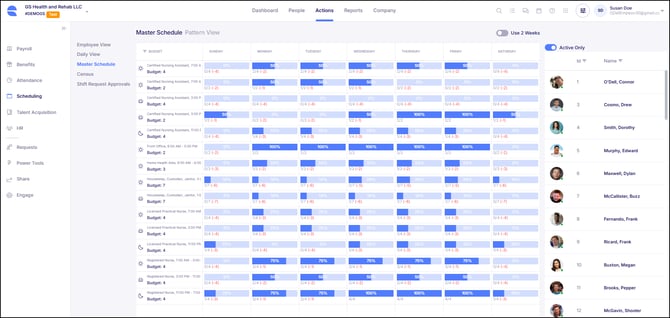
The Master Schedule is displayed across a standard Sunday through Saturday timeframe, with the option to extend the view to a two-week period using the "Use 2 Weeks" toggle in the top right corner.
The Master Schedule represents the intended or baseline staffing for each Budget based on assigned Schedule Patterns and helps identify which Budgets may require consistent manual scheduling. Manual Budget assignments will always need to be handled in either the Employee View or Daily View of the schedule.
The headcount displayed for each Budget within the Master Schedule is calculated based off what is entered within the Schedule Pattern Census field, located within the Budget and census section of the Scheduling Settings Card. This value represents the census applied to Schedule Patterns and may differ from actual census levels, as it is used to establish baseline staffing expectations for pattern-based scheduling.
Master Schedule Report
The Master Schedule Report is a standard report available in conjunction with the Master Schedule and provides a detailed breakdown of Schedule Pattern coverage. The report is exported as an Excel file and organized alphabetically by Schedule Role through worksheet tabs listed along the bottom of the spreadsheet. Each tab displays the Shifts that have been set up within the Schedule Role.
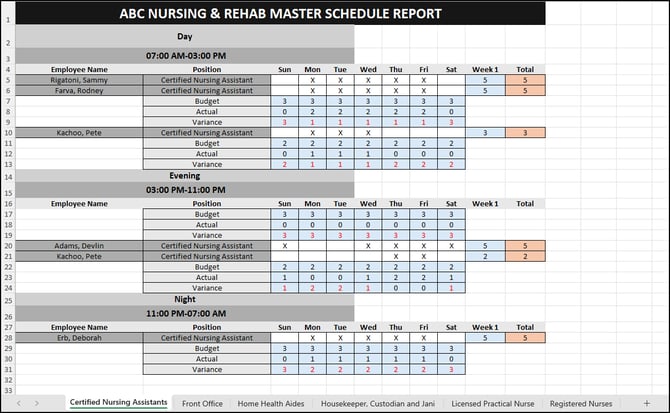
Within the report, data is displayed across a Sunday through Saturday timeframe and it lists all employees assigned to a Shift through a Schedule Pattern for at least one day within the week. For each Shift, the report displays the defined Budget, the actual scheduled headcount, and the variance between the two, allowing for easy identification of gaps in coverage.