
New PBJ Reporting Flexibility
You can now override an employee’s PBJ job code without touching their day-to-day setup. This makes PBJ reporting far more accurate for staff with dual certifications.
What’s new:
- PBJ-only Position Override: Assign a specific PBJ job code (like RN) while keeping the employee’s actual position (like Activity Aide) intact for scheduling and budgeting purposes.
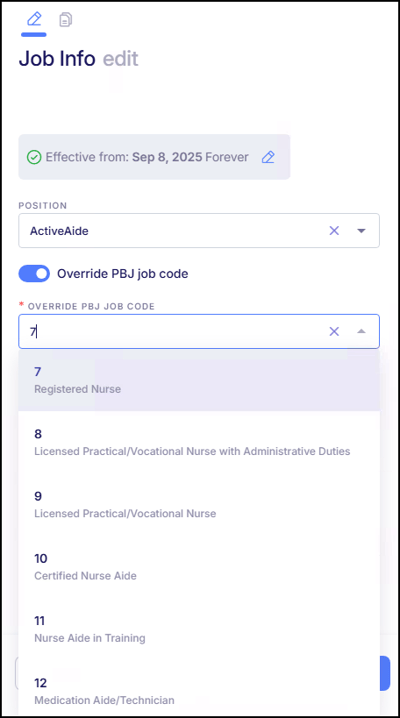
- Clean & Controlled: The override is date-driven, optional, and applies only to PBJ exports.
- Smart Reporting Logic: When enabled, the selected PBJ job code takes priority in the PBJ file, even over timecard-level position overrides.
- No Side Effects: Scheduling, budgeting, and all other modules remain unchanged.
Why it matters: This gives you the precision you need for compliant, accurate PBJ submissions, without compromising operational workflows.
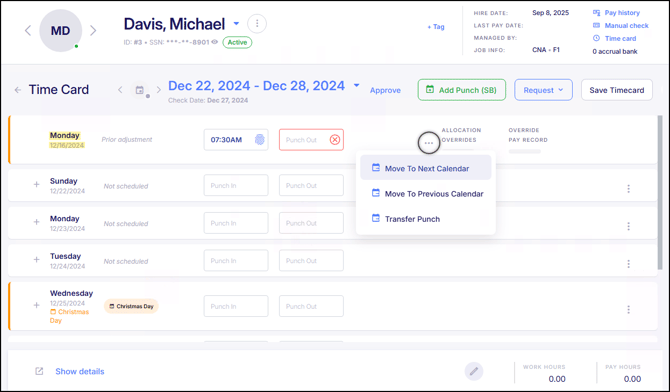
Move Incomplete Punches Across Timecards
Time & Attendance has been updated to provide more flexibility when managing incomplete or unresolved punches. In addition to moving a punch to the next timecard, users can now continue moving incomplete punches across multiple weeks or pay periods as needed. This allows punches to remain adjustable until the employee resolves the issue, helping ensure timecards are finalized accurately without forcing premature corrections.
Improved Effective-Dated Job Info Handling on Timecards
We’ve enhanced how effective-dated Job Info changes (such as position, department, and location) are applied to employee timecards.
What’s improved:
- Timecard punches now reflect the Job Info in effect at the time the work was performed.
- Future-dated Job Info changes apply only to punches on or after the effective date.
This enhancement improves accuracy for timecards, costing, payroll, and reporting when using effective-dated Job Info and Cost Center mappings.
Punch Review: Early & Late Punch Grace Period
Previously within the Attendance Settings Card, the Punch Review Early and Late Punch Margin settings controlled what is considered an early or late punch for review purposes. To standardize terminology and improve clarity, these settings were relabeled to Punch Review: Early Punch Grace Period and Punch Review: Late Punch Grace Period.
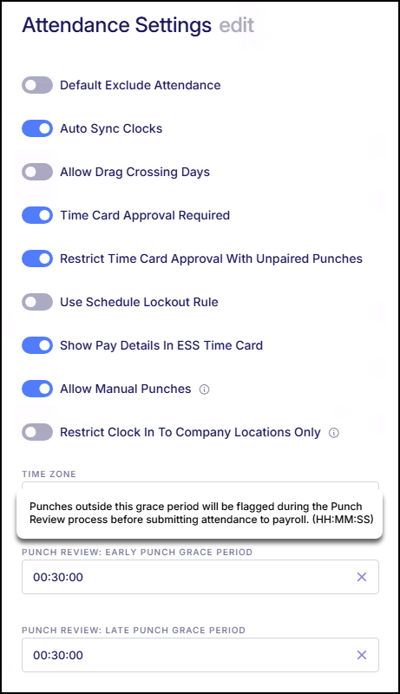
A tooltip has been added explaining that punches outside the defined grace period will be flagged during the Punch Review process before submitting attendance to payroll.
New General Documents Card for Company Documents
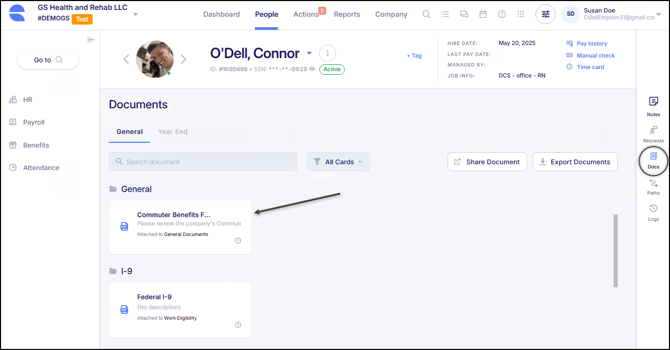
Last release, Empeon introduced the ability to assign company documents to specific Employee Profile cards, allowing documents and uploads to automatically appear in the appropriate section of an employee’s profile after being sent and completed. This release expands that functionality by adding a General Documents card for documents that do not belong to a specific employee profile card and should instead be stored in the General Docs section of the employee's profile.
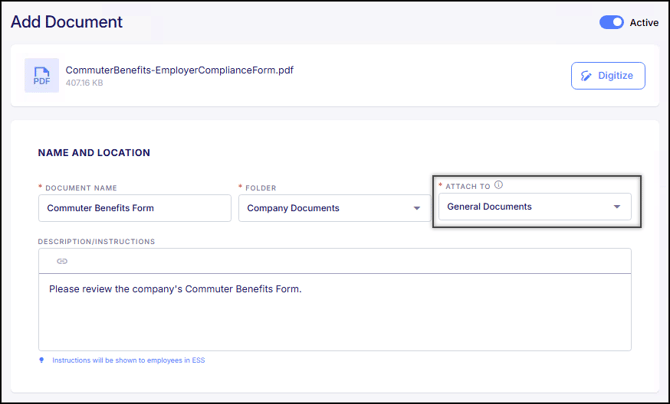
When this card is selected during document setup, completed documents will appear in the employee’s General Docs section, as shown below.
Employee ID and Clock Number Now Displays in ESS
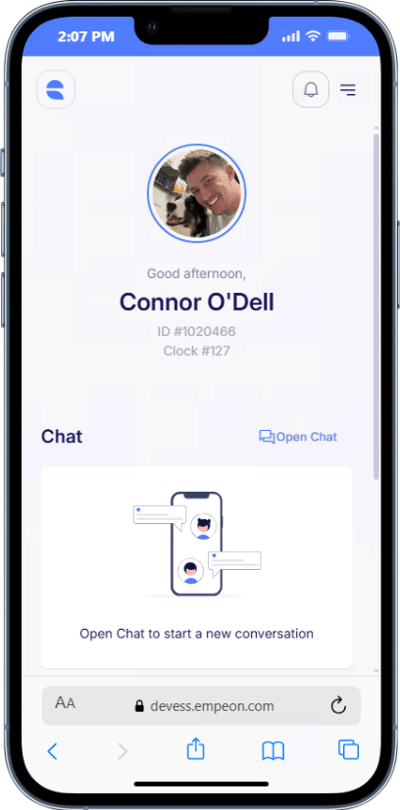
Empeon's Employee Self Service portal has been updated to display an employee’s ID and assigned clock number directly on their Home Dashboard. This information now appears under the employee’s name, making it easier for employees to reference their identifiers without needing to contact an administrator.
Company Admins Can Now Add Additional Company Admins
Company Admins with the "Allow user management" permission can now add new users to the Company Admin role.
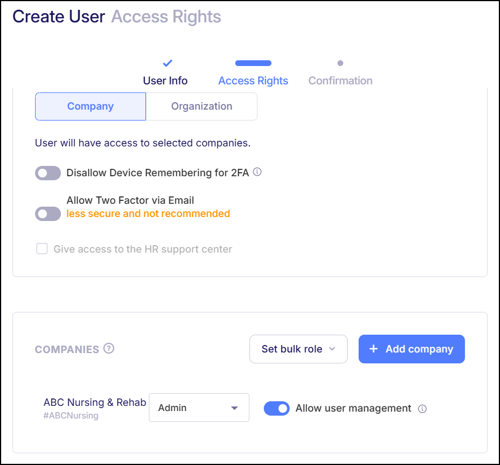
Company Admin access can only be assigned for the same companies the admin is already linked to. This update reduces reliance on organization-level users for admin setup and improves efficiency while maintaining proper access controls.
ACA 1095-C Enhancement for ICHRA Covered Individuals
In an effort to assist with 1095 year-end processing for clients who need to report ICHRA (Individual Coverage Health Reimbursement Arrangement) plans, Empeon has expanded recent 1095-C/ICHRA Plan enhancements. Clients can now have covered individuals for Part III of Form 1095-C imported for employees enrolled in ICHRA plans. This process is handled by Empeon, ensuring accurate reporting for ICHRA benefits.
401(k) Integration: New Data Fields for Roth Catch-Up Contributions
This enhancement ensures that payroll data transmitted to Pay(k)onnect meets the updated regulatory requirements, helping employers stay compliant while automating accurate reporting for affected employees.
Searchable Dropdowns in Wage Scale Setup
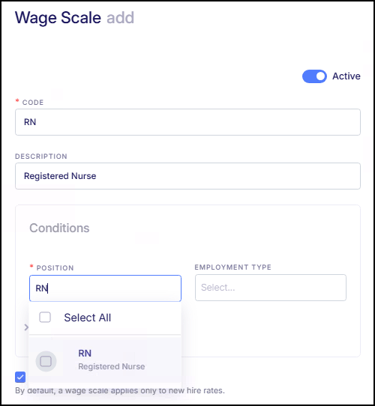
The Wage Scale setup screen has been updated so that dropdown fields now support search, consistent with other areas of the system. Users can type to quickly locate positions or other criteria when configuring Wage Scales. This update improves efficiency during setup and makes it easier to apply the correct wage limits without scrolling through long lists.
Employee Workers’ Comp Rate Support for Applicable States
For states such as Washington that require both employer and employee Workers’ Compensation contributions, Workers’ Comp rate configuration has been updated to support an employee rate.
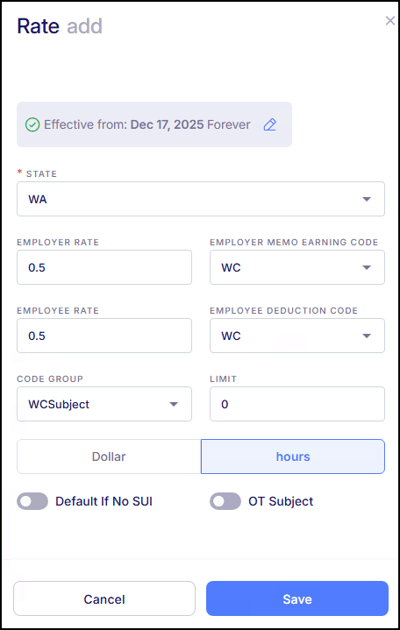
In addition to the existing employer memo earning setup, an employee rate can now be defined and mapped to a deduction code. This allows employee Workers’ Comp contributions to be calculated and applied correctly for employees assigned to the applicable Workers’ Comp code.
Bug Fixes
- Import Error When Updating Taxes for Large Employee Files: There were some reported instances where import files containing more than 50 new employees, along with changes to existing employees’ tax information (such as filing status), would result in an import error. This issue has now been resolved, and imports will process correctly regardless of the number of new employees or tax updates included.
- Approved to Work Live Report Placement: There were some reported instances where the new Approved to Work Live Report appeared at the bottom of the Employee category in Live Reports instead of being alphabetized with the rest of the reports. This has now been corrected. The report is now properly alphabetized within the Employee category, making it easier to locate.
- Rate Change Workflow with Custom Role Permissions: There were some reported instances where users assigned a Custom Role with Pay Info set to "View Only" were still able to save a rate change when they had "Edit or Full Access" to Additional Rates. This behavior has now been corrected. Rate change actions now properly respect the user’s Pay Info permission, ensuring rate changes can only be completed when the appropriate access level is assigned.
- Shift Grace Window Time Card Posting: There were some reported instances relating to the new Shift Grace Window setting Empeon released back in August where punches occurring well outside the defined grace period were not applied to the correct workday. In these cases, early clock-ins were incorrectly posted to the previous day. This issue has now been resolved. Time punches now correctly follow the Shift Grace Window and New Day Start rules, ensuring hours are applied to the appropriate workday.
- Adding Rates and Bonuses in Daily Schedule View: There were some reported instances following the release of rate and bonus limits where schedulers were unable to add rates or bonuses to shifts when working in the Daily View of the schedule, even when the appropriate settings had been configured. This issue has now been resolved. Rates and bonuses can again be added to shifts from the Daily View in accordance with the established limits.
- Negative Tax Amounts for Non-Percentage Taxes: There were some reported instances where non-percentage tax amounts could be refunded as long as the year-to-date balance was positive, which could result in negative quarter-to-date amounts. This issue has now been resolved. The system now prevents negative quarter-to-date tax balances, ensuring tax amounts align with reporting requirements.
- Year-End Overtime Premium Configuration Selection: There were some reported instances during year-end processing where changing the overtime premium configuration from system calculation to import did not require the import step to be completed before moving forward. This issue has now been resolved. The overtime premium selection must now be properly completed before advancing, ensuring accurate year-end reporting.
- MemoER-Health Earning Type in Benefit Plan Setup: There were some reported instances where a MemoER-Health earning type existed in the system but was not available for selection within a Benefit Plan in the Employer Contribution Memo Code field. It displayed only a generic Memo option instead. This issue has now been resolved.