
New Role Permissions for Scheduling
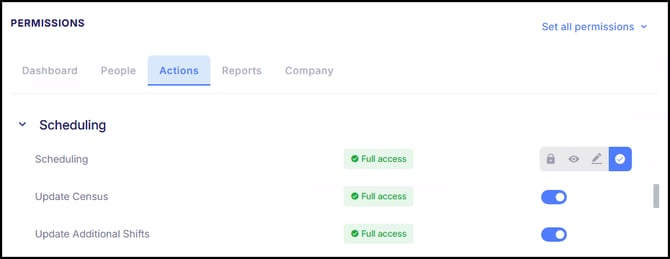
In our last release, we introduced a new Budgets Card that controls how budgets are configured and linked to Shifts. In an effort to continue streamlining our Advanced Scheduling module, new role-based permissions have been added to Scheduling to give organizations more control over who can make budget-impacting updates. These permissions include:
- Update Census - Controls whether users can update census values used in Scheduling. Users without this permission can view census information but cannot update it.
- Update Additional Shifts - Controls whether users can add shifts to the schedule that will put the schedule over budget. This permission applies across both Employee View and Daily View.
Flexible Waive Meal Reason Requirements
In our last release, we introduced the Waive Meal request within Requests & Approvals, allowing employees to request payment for a meal period that would otherwise be treated as unpaid. As part of that release, employees were required to select a predefined Waive Meal Reason when submitting a request, which meant employers first needed to configure Waive Meal Reason codes.
With this update, Waive Meal requests now adjust based on company configuration. If Waive Meal Reasons are configured, employees will be required to select a reason when submitting a request. If no reasons are configured, employees can submit the request using a required comment instead. This enhancement simplifies the request process while still ensuring managers receive appropriate context for review.
Time Card Adjustments Can Now be Applied to Any Payroll Batch
Time Card Adjustments from closed time cards can now be applied to any type of payroll batch. This update removes previous limitations around calendar and batch configuration, allowing adjustments to be included in payroll-only, off-cycle, and retroactive payroll runs, if desired. To maintain accuracy, each adjustment can only be applied once and cannot be included in multiple payroll batches, ensuring time adjustments are processed correctly.
Empeon Workforce Report Enhancements
Company Fields Added to Select Live Reports
Company-related fields are now available in the column chooser for additional Live Reports where they were previously missing. The Custom Transaction Live Report and applicable Gross to Net Live Reports now include options for Company Group, Company DBA, Company Name, and Reference Name. This update supports clearer reporting when working across multiple companies by allowing users to include company context as needed.
Union Codes Added to Timecard Hours Report
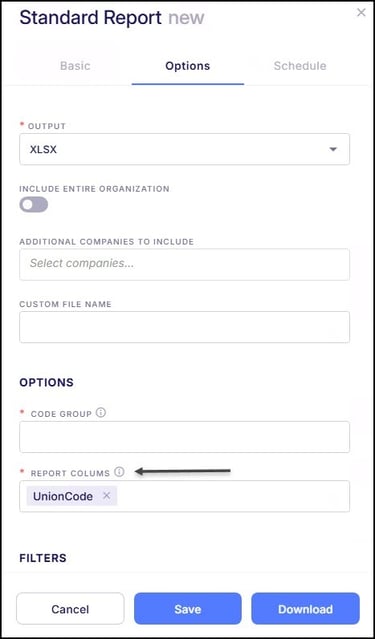
The Timecard Hours Standard Report has been updated to now allow Union Codes to be added as a report column. This enhancement provides greater visibility into union-related timecard data. Simply select "Union Codes" within the Report Columns section to add this as a column to the report.
ESS Announcement Acknowledgement Export
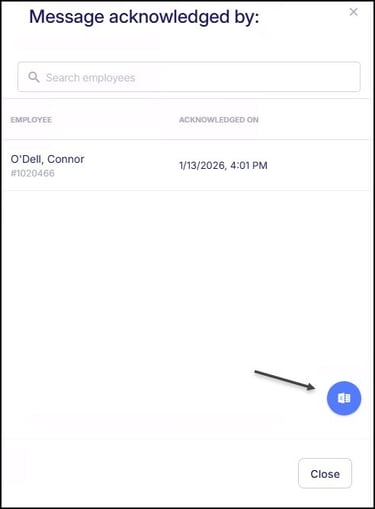
Employers can now export acknowledgement results for Employee Self Service (ESS) announcements that require employee acknowledgement. This enhancement allows teams to easily download and review which employees have acknowledged an announcement, supporting better tracking, documentation, and follow-up when needed. The export provides a simple way to retain records for communication and compliance purposes.
Employee Notification for Deleted PTO Requests
When an approved PTO request is deleted, the system now requires a reason to be entered and automatically notifies the affected employee via email. This helps ensure employees are aware when a previously approved request is removed and understand why the update was made. The notification includes the date and time of the affected PTO along with a submitted message by the user deleting the request.
Improved Employee Search Flexibility
The employee search in both the employee list and employee navigation has been enhanced to support full name entries in multiple formats. Previously, searches required a specific “Last Name, First Name” format. Users can now search using either first and last name order, making it easier and more intuitive to quickly locate employees throughout the system.
Updated Onboarding Review Verbiage
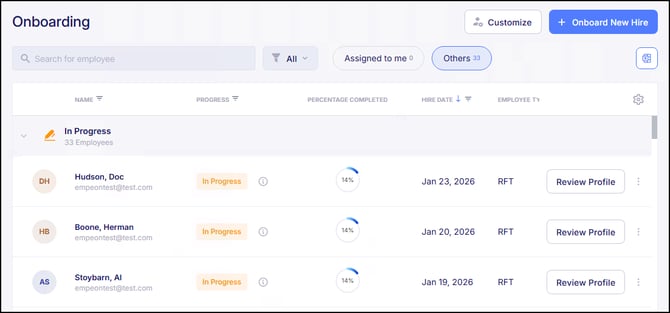
To better align system language with the onboarding review process, the button used to review onboarding template progress has been updated to “Review Profile". This was previously labeled “Manage Profile". The updated terminology more clearly reflects the action being performed during onboarding.
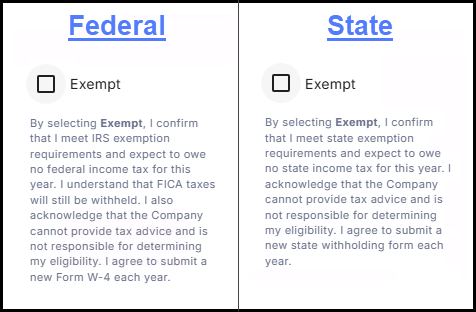
Updated W-4 Exempt Selection Messaging
The messaging shown to employees when selecting an exempt status for federal or state tax withholdings has been updated during Self-Onboarding and in Employee Self Service. The revised language provides clearer guidance around exemption requirements and clarifies that employees are responsible for their own tax elections, while the company cannot provide tax advice or determine eligibility. This update helps set clearer expectations and supports better understanding when employees make exemption selections.
ACA Updates for 2025 Filing
To support accurate ACA reporting for the 2025 filing year, employers can now request for Empeon to import covered individual information directly to 1095 forms for ICHRA plans as part of the ACA reporting process. This enhancement ensures dependent coverage details are properly reflected on Form 1095 and automatically applied wherever required, including PDF's, and electronic filings. By improving how covered individual data is captured and carried through ACA outputs, these updates help streamline filing preparation and support more accurate, compliant submissions.
Bug Fixes
- Scheduling Budgets: In our latest release, we introduced Budgets as a key component for establishing budget rules associated with designated shifts. An issue was identified where error messages were being cut off when configuring budgets due to the input fields appearing within a scrollable area. This issue has been resolved, and error messages now display fully as expected.
-
Employee Accrual Summary Balance Display Alignment: When expanding an employee’s accrual bank, the current balance values in the Accrual Summary did not appear properly aligned within their designated display boxes. This issue has now been resolved. Accrual balance amounts are now correctly aligned within their respective sections, improving readability and overall user experience.
- Log Changes Calendar Navigation: There were some reported instances where users were unable to navigate between months when using the calendar component within the Log Change report. Selecting the arrows did not update the displayed month, limiting the ability to filter logs by date range. This issue has now been resolved. Users can now successfully navigate between months using the calendar arrows, and the selected month is correctly reflected in the logs.
- Batch Card Display on Smaller Screens: There were some reported instances where, on smaller screen sizes or lower resolutions, the Batch Card content could overflow its container, causing certain payroll steps to be partially cut off. This issue has now been resolved.
- Reports Page Loading Error with Saved Date Selections: There were some reported instances where the Reports page could fail to load if a saved report was marked to use a date selection, but no date values were present. This issue has now been resolved, and the Reports page will load correctly in these scenarios.
- Negative Box 10 Amounts on W-2 Forms: There have been instances during W-2 processing where it would return an error when a negative amount appeared in Box 10. This issue has now been resolved, allowing W-2s to process correctly in these scenarios.