
New Scheduling Configurations for Shifts & Budgets
Shifts and Budgets are now configured as two separate components, allowing for greater flexibility when building and maintaining schedules. To support this change, a new Budgets Card has been added within the Scheduling section of the Company tab, providing a more user-friendly and centralized way to manage budget rules.
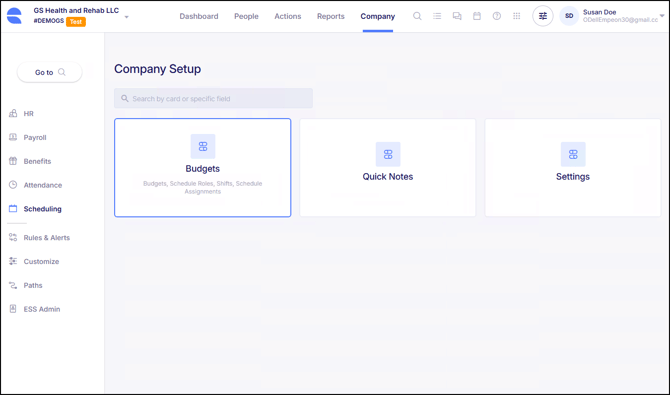
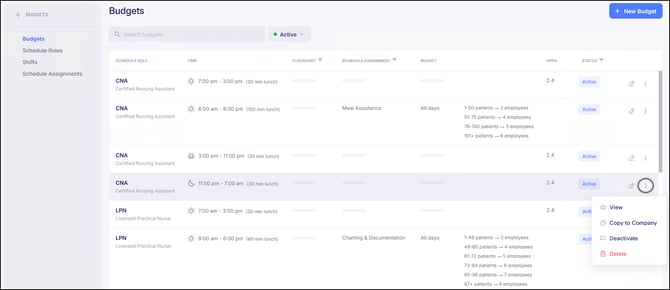
Within the Budgets Card, the Budgets section is now used to define budget rules, employee eligibility, applicable days of the week, and which Shift is linked to the budget. These elements were previously configured directly within Shifts.
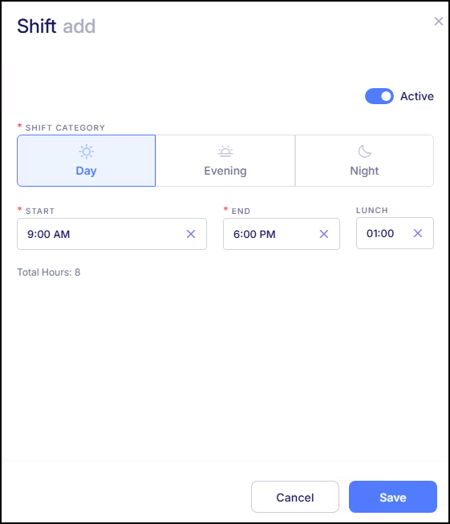
Bringing them together under Budgets makes it easier to adjust staffing and budget requirements without modifying individual Shift setups. As a result, Shift configuration has been intentionally simplified. Shifts now focus solely on defining the shift category (day, evening, or night), start and end times, and any lunch duration, if applicable. This reduces the need to recreate multiple Shifts with the same timeframes simply to support different budget or eligibility requirements, making it faster and easier to build and manage schedules on a day-to-day basis.
With this release, the configuration that previously lived inside individual Shifts has been reorganized within this new Budgets Card, broken down into four main components:
Schedule Roles (formerly Position Groups)
Position Groups have been renamed to Schedule Roles. Their function remains the same, but they are now linked to Budgets rather than individual Shifts to determine employee eligibility. Schedule Roles represent a position or group of positions and define which employees can be scheduled for a given budget. This update is primarily a terminology change that better reflects how the field is used within the new scheduling structure.
Shifts
Shift configuration now focuses only on defining the Shift Category (day, evening, or night), Start and End times, and a Lunch duration, if desired. There is also now a "Total Hours" counter to calculate the total shift time, minus any lunch durations that have been applied.
Because shifts now represent only a specific timeframe, a single Shift can be used across multiple budgets. This eliminates the need to create duplicate Shifts with the same start and end times to support different positions or budget requirements, since those rules are now managed within Budgets.
Schedule Assignments
Schedule Assignments provide a way to further distinguish budgets that share the same role and shift timing but represent different types of work. They allow organizations to classify what employees are expected to do during a shift without requiring separate shifts to be created.
Previously, when multiple budgets were needed for the same role and shift timeframe, users often created duplicate shifts and relied on shift codes or descriptions to indicate differences in the work being performed. For example, the same CNA day shift might require separate budgets for standard duties versus transport or support tasks. Schedule Assignments now provide a clearer way to define those distinctions.
Budgets
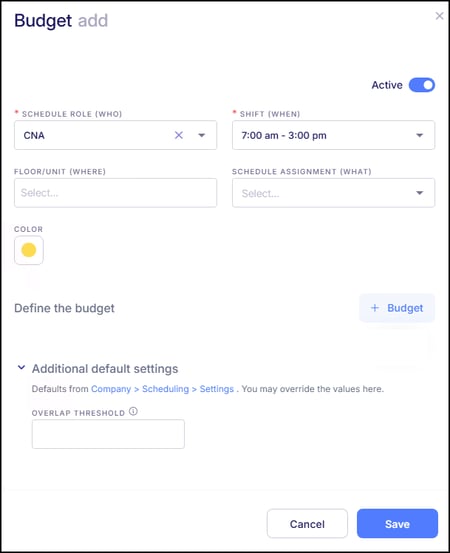
The Budgets section is now the central place where scheduling requirements come together. Budgets can be configured once the other components are in place, since Schedule Roles, Shifts, and Schedule Assignments can all be linked to a budget.
When creating a budget, users define:
- Who: the Schedule Role
- When: the Shift
- What: the Schedule Assignment, if applicable. This identifies the type of work being performed when there are multiple budgets that share the same Schedule Role and Shift timeframe.
- Where: the Floor/Unit or other applicable Job Info field
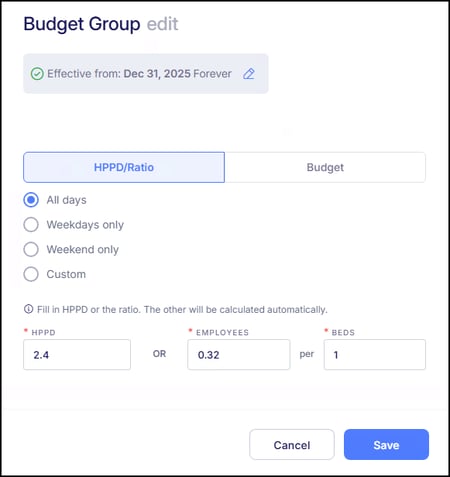
After establishing the criteria for a budget, users then configure the budget rules themselves. Budget setup continues to support the two existing methods, Budget and HPPD/Ratio, with the added ability to define different rules by day of the week within the same budget. This allows a single budget to support varying staffing or coverage needs across different days without creating duplicate budgets.
The HPPD Budget Type has been renamed to HPPD/Ratio to better reflect how staffing requirements are calculated. In both budget methods, users provide a single staffing value, and the system automatically calculates the related requirements, reducing the need for manual calculations and adjustments.
Once a budget is configured, any Shifts linked to it become available on the schedule for assignment.
For all Budgets that have been configured, the Budget section displays a clean dashboard of each budget’s details, making review and ongoing maintenance significantly easier.
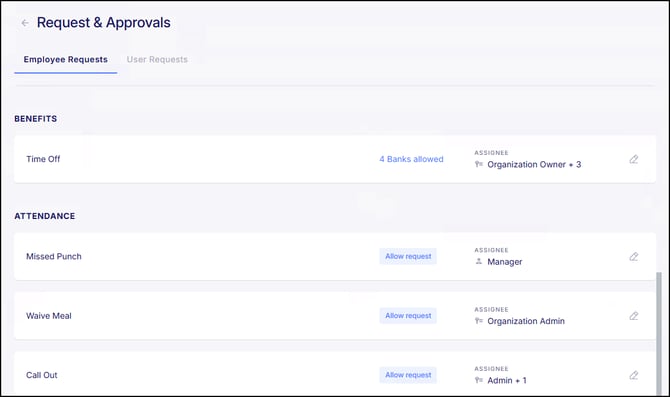
New Waive Meal Employee Request
A new Waive Meal request has been added to Requests & Approvals. This request is applicable to organizations that have unpaid lunches automatically deducted from an employee's set of punches.
Now, when an employee works through an unpaid lunch, they can now submit a Waive Meal request to be paid for that time. Previously, unpaid lunch adjustments required a Workforce user to manually enter this on the time card. This update automates the process by allowing employees to submit the request, with approval from a designated assignee automatically applying the change to the time card. This also provides a clear record of all waived meals.
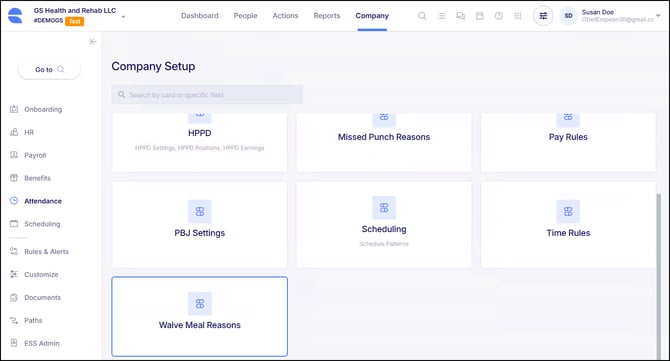
To support this request, a new Waive Meal Reasons Card has been added under Company > Attendance settings. At least one reason in order for an employee to be able to submit their request.
New Disbursement section in Pay History & Pay Entry
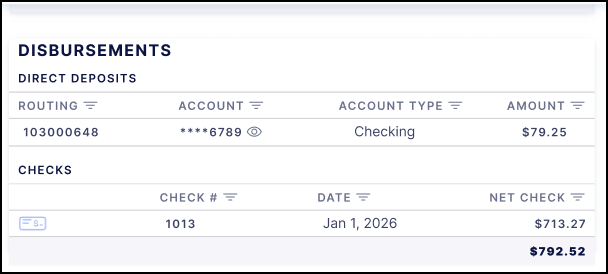
In an employee's Pay History, and within their Pay Entry, there is a new Disbursement section to break down all payment methods applied toward a payroll transaction. This includes both direct deposits and checks, showing details such as amounts, dates, and status. This new view provides a clearer, more organized way to review payment information for each payroll.
System Performance & Reliability Enhancements
We’ve made continued investments in system performance to keep Empeon fast, stable, and reliable. These improvements help ensure a smooth experience today and set the foundation for continued enhancements throughout 2026.
Clock Device Status Widget Update
The new Clock Device Status widget that we released last month has been updated to always display device status, even when all configured time clocks are online. Previously, when no warnings or errors were detected, the widget did not show device status tiles, which limited visibility into clock connectivity.
With this update, the Online status tile is now displayed when all clocks are functioning normally. This allows users to quickly confirm that all devices are online at a glance, without needing to wait for an error or warning to appear. This enhancement improves day-to-day monitoring and provides clearer confirmation of clock availability directly from the Dashboard.
Clearer Auto-Populated Fields in Document Digitization
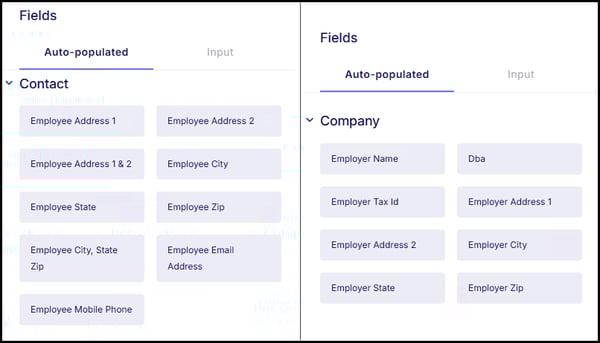
Auto-populated fields used when digitizing documents have been updated to more clearly indicate whether the data is pulled from an employee record or the company record. Previously, fields such as Address, City, or Email appeared in multiple sections without specifying their source, which could lead to the wrong information being selected.
With this update, auto-populated fields in the Contact section are now clearly labeled as Employee fields, and auto-populated fields in the Company section are labeled as Employer fields. This improves clarity when configuring documents and helps ensure the correct data is applied during form completion.
W-4 Form Updates for 2026
The 2026 Form W-4 has been updated in Empeon Workforce to align with the latest IRS requirements. These updates include support for the exempt status being selected via a checkbox and an adjustment to the child tax credit calculation to reflect the updated $2,200 amount per qualifying child. These changes ensure that employee withholding elections are captured accurately based on the current W-4 form.
401(k) Integration Enhancement
Empeon's Pay(k)onnect 401(k) integration now supports multiple 401(k) plans within a single company. This allows organizations to manage separate plans, such as union and non-union plans, without requiring additional company setups.
Bug Fixes
- Custom Employee Import Error Fixed - There were reported instances where custom employee import files would generate an error related to the default tax column. This issue has now been resolved, and custom imports will process correctly.
- Daily View Bonus Entry Fixed - In a recent release, enhancements to rate and bonus limits were added to Scheduling. After the rollout, some clients experienced an issue in the Daily View where bonuses could not be added directly to a shift, even if limits were properly configured. This issue has now been resolved, and bonuses can be applied to shifts in the Daily View as intended.
-
Display Issue in Dark Mode - An issue has been resolved where text appeared white in certain areas of the system when Dark Mode was enabled, making content difficult to read. This issue has been corrected to ensure text remains clearly visible across all supported display settings.
- Approval Permissions Enforced - An issue was resolved where users with an HR role could approve requests when they were not assigned as the designated assignee and the Only assignees can approve setting was enabled. This behavior specifically affected time-off requests and has since been corrected.