
Requests Now Viewable on the Time Card
Missed Punch, Time Off, Waive Meal, and Bonus requests can now be reviewed directly from the employee’s timecard. This helps to attend to these requests in a more timely matter all within the same workflow used to review and manage hours.
When a request exists for a specific date, the timecard will display an indicator reflecting the pending request. If multiple requests exist for the same day, the timecard will display the total number of pending requests with the option to "View requests".
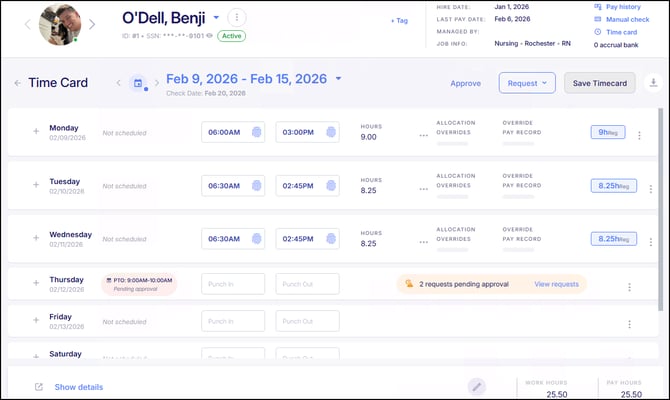
Selecting "View requests" will display each request individually, clearly identifying the request type and associated details. Authorized users can review request information and take action directly from the timecard. Once approved or denied, the request status is updated accordingly and reflected where applicable on the timecard. This enhancement improves visibility and streamlines approvals by allowing all related requests to be reviewed in the context of the employee’s scheduled time.
Gross to Net Reports – Dynamic Cost Center Grouping
The Gross to Net by Labor and Gross to Net by Labor by Employee reports have been updated to dynamically group results based on the Cost Center levels selected in the report. Previously, these reports grouped data by all Cost Center levels (CC1–CC5), even if some levels were removed from view.
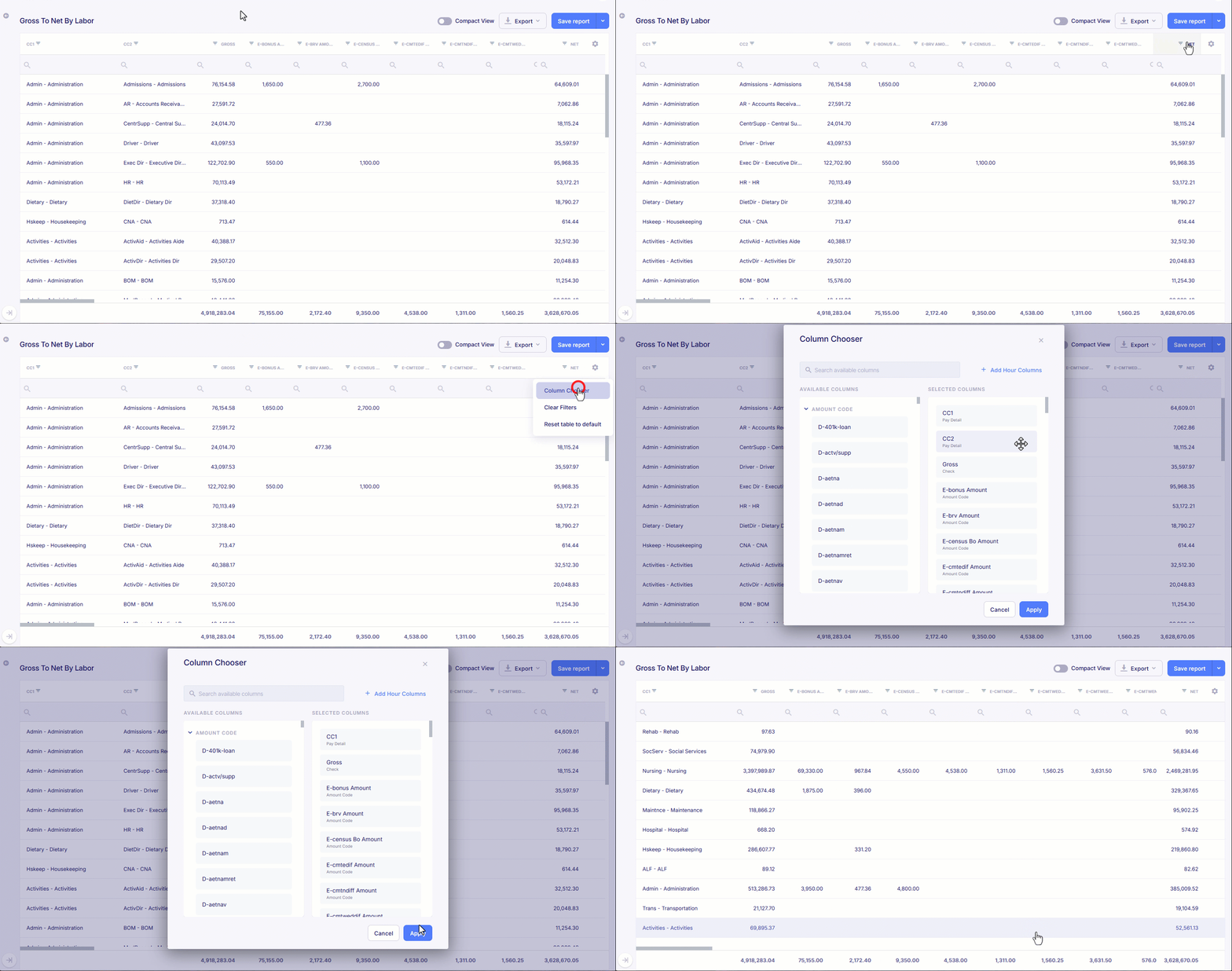
For example, if a user wants to review Gross to Net totals by CC1 only, without breaking the data down by other Cost Center levels, they can simply remove the other Cost Center columns and leave CC1 within the report. The report will then automatically group and aggregate the data by CC1, providing clear, consolidated totals. With this update, these reports are now easier to use and analyze by the Cost Center.
Advanced Scheduling Enhancements
Duplicate Budgets
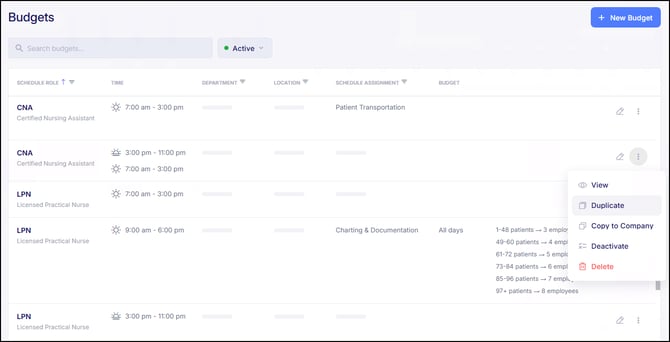
Budgets can now be duplicated to simplify and speed up budget creation. A new "Duplicate" option has been added to the three-dot menu on existing budgets, allowing users to create a new budget based on the settings and components of an existing one. This is especially helpful when setting up similar budgets, as it reduces repetitive configuration and helps maintain consistency across budget configuration.
Improved Error Messaging When Deleting Budgets
Error messaging has been enhanced when attempting to delete a budget that cannot be removed. Instead of a brief notification, users will now see a detailed message explaining why the budget cannot be deleted.
If employees are currently assigned to the budget, the following message will display:
“This budget can’t be deleted.
Employees are currently assigned to this budget. Reassign or remove those employees before making this change.”
This update provides clearer guidance and helps prevent confusion during budget management.
New Payroll Audit: Date of Service
A new payroll audit has been added to help identify late-submitted visits and time entries, where the Date of Service (clock-in or visit date) is older than a defined number of days before the check date.
This audit is particularly helpful for Home Care and HHA providers, where visits are often submitted days or weeks after service is provided, creating a risk of missed, duplicated, or unexpected payroll payments. The audit flags records where the Date of Service exceeds the configured threshold, allowing administrators to review delayed submissions before payroll is finalized.
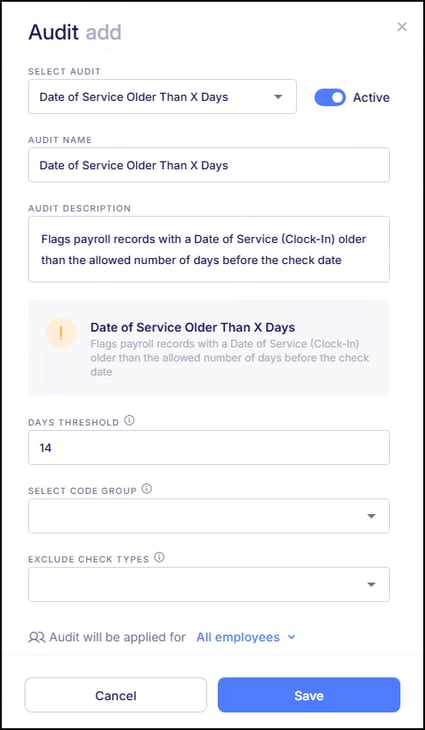
For example, if payroll is being processed for a check date of March 15 and the audit is set to flag records older than 14 days, any time with a Date of Service prior to March 1 would be flagged for review. By surfacing delayed visit entries in advance, this audit helps Home Care organizations improve payroll accuracy, reduce reprocessing, and maintain better compliance and financial control.
To activate this new audit, navigate to: Company > Rules & Alerts > Audits > Payroll Audits, click “New Audit”, and select “Date of Service Older Than X Days".
PBJ Standard Reports Support Multi-Company Output
Previously, when running either the PBJ Detail report or the PBJ Errors and Warnings report, the output only included data for the company the user was logged into, even when the report was configured to include additional companies within the organization. These reports now correctly return data for all selected companies, allowing PBJ reporting to be run across the full organization as needed.
Archived Tag Added to Documents in Onboarding Templates
Archived documents that are still included within an onboarding template will now display with an Archived tag and appear as disabled within the template.
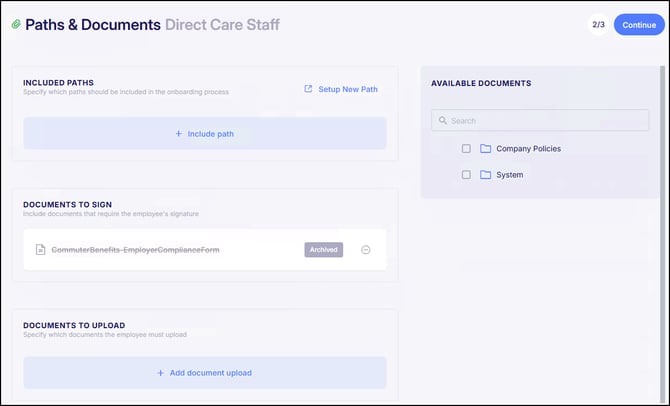
This provides clearer visibility that the document is no longer active and ensures it will not be visible to recipients of the onboarding template. Archived documents can be removed from existing templates as needed, and once archived, they will no longer be available for selection when adding documents to a template.
Deactivate Paths at the Company Level
Administrators can now mark paths as Active or Inactive at the company level. Inactive paths remain available for employees who are already assigned to them or are in the process of completing them, but they will no longer be available for new assignments, sharing, or use in onboarding templates. This update makes it easier to manage and retire paths without disrupting existing progress.
Paths can also be reactivated if needed, and the Paths page now clearly displays each path’s status with options to filter and search by Active or Inactive paths.
Automated Deactivation of Driver’s Licenses
In our last release, we introduced automated deactivation for Licenses and Certifications to ensure only the most current record remains active. With this release, similar functionality has been extended to Driver’s Licenses.
When an employee’s Driver’s License is updated, any existing record tied to the same License Class and State will now be automatically deactivated upon saving the new record. This helps maintain accurate employee records and reduces the need for manual cleanup when licenses are renewed or replaced.
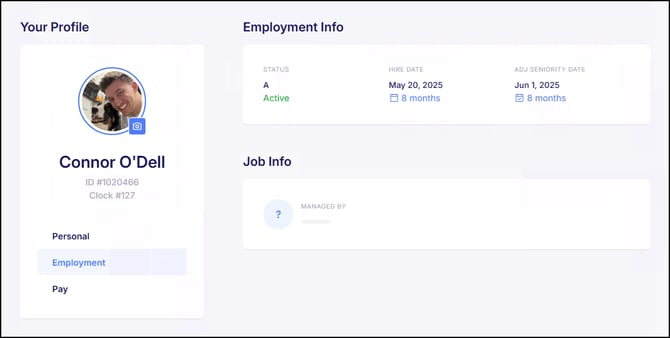
ADJ Seniority Date Added to ESS
The ADJ Seniority Date will now display within the Employment section of an employee’s profile in the ESS Hub, when one is present on the employee record. If no ADJ Seniority Date has been entered, the field will not appear in ESS.
Michigan & Detroit Annual Tax Form Updates for 2026
Michigan and Detroit annual tax forms have been updated for the 2026 filing year to reflect the latest versions released by the state. The system-generated PDFs now align with the approved 2026 layouts, including updated barcodes required for filing. Form data will continue to populate as expected, with minor updates applied where required to reflect changes to the official forms. These updates ensure compliance with Michigan’s 2026 annual filing requirements.
Bug Fixes
- Digitized Field on Document Incorrectly Showing as Required - There were reported instances where a non-required field within a digitized document would display as required for the recipient. This issue has now been resolved, and only fields that have been marked as required will display as such.
- Multi-Approval Bonus Requests Hidden After Initial Approval - There were some reported cases where bonus requests requiring multiple approvals would disappear from view after the first approval was completed instead of show that is was still pending. This issue has now been resolved. Bonus requests will remain visible and update appropriately after each approval step until the process is fully completed.
- Error When Waiving Multiple Benefit Offers - There were reported instances where users encountered a validation error when attempting to waive multiple benefit types (such as medical, dental, and vision) at the same time. This issue has now been resolved, and multiple benefit offers can be waived and saved in a single action as expected.
-
Ineligible Employees Assigned to Shifts - There were reported instances where users could assign employees to shifts they were not eligible to work, particularly when viewing schedules filtered to include all position groups. This could result in employees being scheduled for roles they were not approved to perform. This issue has now been resolved. The system now prevents ineligible shift assignments and clearly notifies users when an assignment is not allowed, ensuring schedules align with employee job eligibility.