
Edit Assigned Shifts Without Reassigning
Schedulers can now make updates to assigned shifts without needing to remove and reassign them. Previously, making changes such as adjusting shift time, floor/unit, or schedule assignment required manually deleting the assigned shift and then reassigning the appropriate on. With this update, Schedulers can now update shift time, floor/unit, and schedule assignment, directly from the original shift that is assigned.
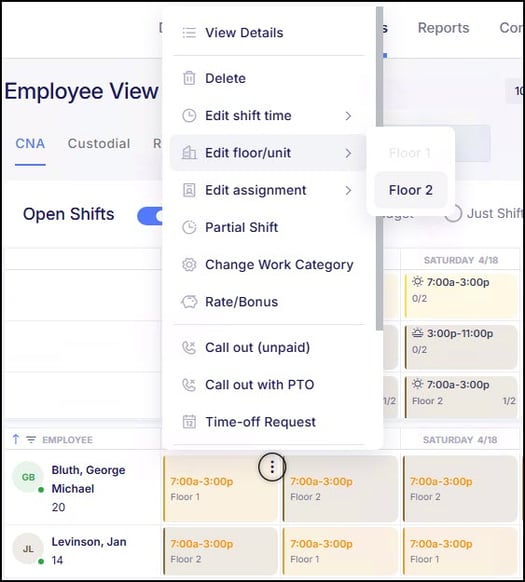
The available options will dynamically adjust based on the employee’s applicable schedules and Approved To Work assignments, ensuring that only valid selections are available when making these updates.
This enhancement streamlines schedule management by reducing manual steps and making it easier to apply changes without disrupting existing shift assignments.
Open Shift Requests Added to Request & Approvals
Requesting open shifts within Empeon’s Advanced Scheduling has always been available; however, this process was not previously part of the Request & Approvals framework and did not support a structured approval workflow. With this update, open shift requests are now registered as a formal request type within Request & Approvals, allowing organizations to define a structured workflow and assign designated reviewers responsible for approving these requests.
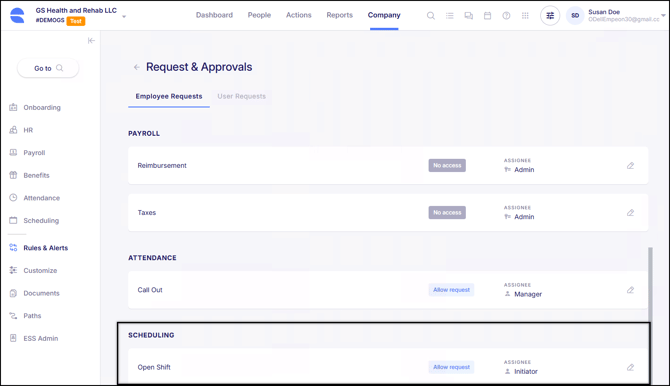
To maintain the current process as this is released, this request will be enabled by default for all clients using scheduling, with the assignee set to Initiator (the user who posted the shift). This mirrors how the process has functioned up until now. However, now that this is a request that is formally part of Request & Approvals, the ability to configure approval workflows and assign designated assignees is now available.
Along with this update, real-time email notifications are sent to assignees when an employee requests an open shift. This update helps ensure requests are reviewed promptly while allowing flexibility in how approvals are managed.
PBJ Export Updated to CMS Specification Version 4.10.0
CMS has updated its PBJ Data Specifications to Version 4.10.0, requiring PBJ submissions to meet new validation standards effective April 1, 2026. Empeon has updated the PBJ XML export to align with these requirements, ensuring files generated through the system remain compliant for submission.
As part of this update, no automatic cap has been applied within the export for hours exceeding CMS thresholds. Since handling overages may vary by organization, users can instead leverage the PBJ Error & Warning Report to identify entries exceeding the 22.5-hour threshold prior to submission.
Schedule Lockout Updates
Improved Schedule Lockout Syncing
When the Schedule Lockout Rule is enabled, clock settings and schedules will now be sent to the clock automatically. Previously, these updates required a delay before taking effect. With this update, schedules are sent immediately, allowing schedule lockout rules to be enforced without waiting for the nightly sync.
Schedule Lockout Fix for Punch and Timecard Issues
There were a few reported cases where Schedule Lockout settings caused unexpected behavior, including preventing employees from clocking in, ignoring approved missed punch requests, rejecting valid punches under certain scheduling conditions, and not automatically sending updated schedules to the clock when schedule patterns were added or modified. These issues have now all been fixed.
Punch & Schedule Reports Now Available Based on Role Access Filters
Previously, users with access limited to specific employees were unable to view certain Punch and Schedule Standard Reports. Because these reports included all employees by default, the system applied user-level access filters and prevented the reports from being available.
These reports are now accessible as expected. While the reports themselves are visible, employee-level data within the reports will still respect existing access filters, ensuring users only see the employees they are permitted to view.
The following standard reports have been updated to reflect this behavior:
- Employee Schedule
- Punch & Schedule Exceptions
- Punch Report
- Schedules and Punches Report
- Unpaired Punch Report
Time Zone Added to Locations
A Time Zone field has been added to Job Info Locations and will now be automatically assigned based on the address entered for the location, specifically driven by the zip code.
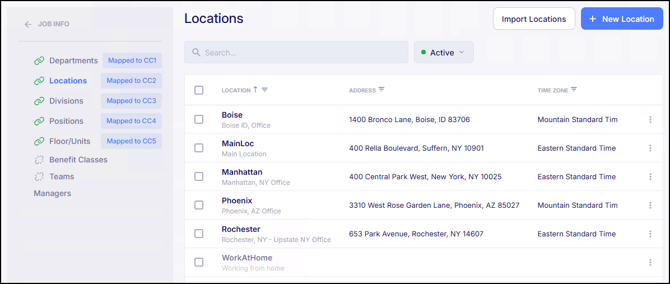
This time zone is used when calculating attendance and punch data, ensuring time entries are aligned with the correct local time for each location. For Work at Home locations, the system will use the employee’s home address to determine the appropriate time zone.
Time zone has also been incorporated into company setup and import processes, improving visibility and reducing the need for manual updates when managing locations.
WOTC Task Prefills Employee Information
The WOTC.com task within Paths has been enhanced to automatically prefill employee and job information when the form is opened.
The WOTC integration allows organizations to collect information required to submit Work Opportunity Tax Credit (WOTC) forms to WOTC.com as part of onboarding or other employee workflows. With this update, when an employee accesses the WOTC task, key details such as name, address, contact information, position, and hire date will now be populated automatically using information already stored in the system. This update reduces the need for manual data entry and helps streamline completion of the WOTC form.
View Licenses and Certifications in the ESS Hub
Employees can now view their Licenses and Certifications that are on file within Empeon Workforce directly within their ESS Hub.
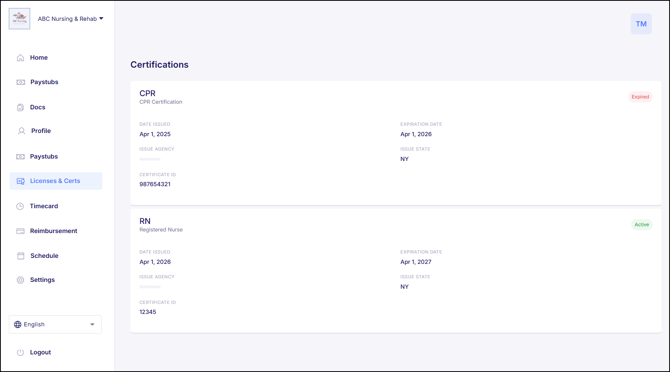
A new section for Licenses & Certs has been added where employees can view all active and expired licenses and certifications associated with their profile. Within this section, employees can review license details, confirm what is on file, view the current status, and access any attached documents.
This enhancement provides greater visibility into employee credentials and helps employees stay informed as records approach expiration or renewal. Additional Requests & Approval functionality to support employee-submitted updates and renewals is planned for a future release.
Custom Reimbursement Now Available in Requests & Approvals
Additional flexibility has been added to ESS Reimbursement Requests, allowing organizations to define their own custom reimbursement types. In addition to the existing pre-defined reimbursement categories, users can now use the “+ Add Custom” button to create and configure custom reimbursement types that will be available for employees to request through their ESS Hub.
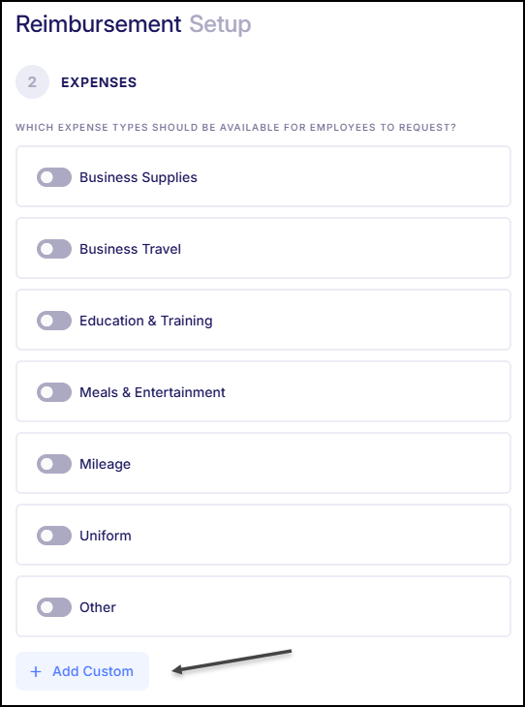
This allows organizations to create reimbursement types that align with their internal payroll codes and classifications, beyond the default options available.
Share Documents Using Filter Groups and Employee Selection
When sharing documents, users now have more flexibility in selecting recipients. In addition to creating custom filters, users can apply Filter Groups when determining which employees should receive a document. Users can also manually include or exclude specific employees by selecting them individually. These options can be used together, allowing users to override filter criteria by including or excluding specific employees as needed. This update aligns the document sharing experience with other areas of the system, providing greater control over how documents are distributed.
W-4 Path Task Now Automatically Skipped for Agency Employees
Now, when a Form W-4 task is included within a Path assigned to an agency employee, the task will now be automatically skipped. Since W-4 information for agency employees is not managed within Empeon, they will not be prompted to complete this task. If a Path contains only a W-4 task, it will not be shared with the agency employee. This update helps streamline the Path experience by ensuring employees only receive tasks relevant to their role.
Custom Transaction Live Report Enhancements
The Custom Transaction Live Report has been enhanced to include additional paycheck-level fields, such as check date, batch, gross, net, and related pay history details.
The report will now also dynamically adjust its aggregation based on the fields selected. When check-level fields are included, results will group accordingly; otherwise, data will remain summarized at the employee level.
Updated NYS IT-2104 Form
The New York IT-2104 form (State W-4) has been updated for 2026 and is now available within Empeon Workforce. During this update, the previous 2024 version of the form was temporarily archived, which may have impacted Paths and Onboarding Templates that were using the older version. The 2024 form has since been reinstated, and now both versions are available for use.
Companies that have Paths and Onboarding Templates with the older version of the NY IT-2104 form should review their existing configurations to ensure that the correct version of the form is included. Both documents are available within the System folder and are clearly labeled as:
- NY W-4 (IT-2104) - 2024
- NY W-4 (IT-2104) - 2026
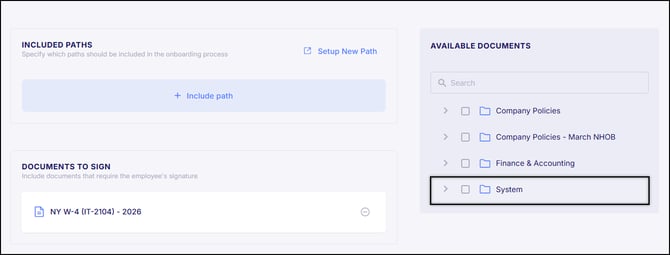
To update a Path:
- Navigate to Company > Paths
- Edit the desired Path
- Edit the designated Task for NY IT-2104
- Update the Select Document field to “NY W-4 (IT-2104) – 2026” by either searching for the document or selecting it from the System folder
- Click Done within the Task, then Save the Path.
Onboarding Templates with this Path included will automatically be updated. Onboarding Templates only need updating if the NY IT-2104 form is included as a standalone document.
To update an Onboarding Template:
- Navigate to Company > Onboarding > Onboarding Templates Card
- Edit the desired Onboarding Template
- Navigate to the Documents To Sign section and remove the document titled "NY W-4 (IT-2104) – 2024"
- Then add the "NY W-4 (IT-2104) – 2026" document by either searching for the document in the "Available Documents" section or selecting it from the System folder
- Click Continue and then Save
- Then click Save again on the Confirmation screen
Bug Fixes
- "Direct Deposits - View Full Account Number" Permission Not Saving – There were reported cases where the “Direct Deposit – View Full Account Number” permission could not be disabled when the regular "Direct Deposits" permission was set to View only. This issue has now been fixed.
- E-Verify Submission Error Due to Document Number Formatting – There were a few reported cases where E-Verify submissions returned an error when document numbers included spaces, preventing successful case submission. The system has been updated to remove spaces from document numbers to ensure they are submitted in the correct format. This issue has now been fixed.
- Incorrect Request Amounts Showing in Call Out Section – There were reported cases where the request count within the Call Out tab of Shift Request Approvals included all request types, instead of only just call out requests. This caused the displayed count to be higher than the actual number of call out requests shown. This issue has now been fixed.
- Onboarding Excel Export Error When Adding Columns – There were reported cases where exporting onboarding data to Excel resulted in an error when a column was added through the column chooser tool. This issue has now been fixed.
- Scheduling Grid Shift Assignment and Color Display Issues – There were reported cases where assigned shifts displayed the incorrect color in the scheduling grid. There were also some reported cases where manually assigned shifts did not save the selected shift. Both of these issues have now been fixed.
- ATS Integration 404 Error – There were reported cases where clients using the Applicant Tracking System (ATS) experienced a 404 error due to an external system change impacting the integration. The necessary updates have been made to ensure continued functionality. This issue has now been fixed.