
What are Unions?
Unions are organizations formed by employees who join together to represent their shared interests in the workplace. By acting as a collective group, employees have a structured way to address topics such as wages, work hours, job duties, and overall working conditions. The relationship between the union and the employer is defined through a Collective Bargaining Agreement, often referred to as a "CBA". This agreement outlines the rules and expectations that guide employment for the workers within the union.
In many industries, including healthcare, these agreements shape a large part of daily workforce operations. A CBA can determine how wages are set, which shift differentials apply, how shifts are assigned, and what benefits employees receive. It may also describe formal processes for raising concerns or resolving workplace disputes. These details often reflect the needs of a workforce that relies on round-the-clock staffing, specialized roles, and varying levels of training or certification. Because a CBA provides clear and enforceable rules, it becomes an important reference for payroll, scheduling, and HR processes. Items such as wage scales, seniority structures, required deductions, and eligibility rules must be recorded and applied consistently. This is especially important in healthcare settings where employees such as nurses, aides, therapists, and support staff may fall under different unions or different agreements within the same organization.
A solid understanding of how unions function creates the foundation for managing union settings in Empeon Workforce. The following sections will explain how these rules translate into system configuration, including how union records are defined, how employees are assigned to them, and how related calculations and deductions are handled.
Understanding Union Dues
Union dues are payments made by covered employees to support the operations of the union. These funds cover expenses such as contract negotiations, grievance handling, member representation, and general administration. Dues also help maintain the resources needed to enforce the terms of the collective bargaining agreement. Each union sets its own dues structure. This may be a standard flat amount, a percentage of wages, or an amount that varies based on job type, hours worked, or seniority. The method is defined by the union and outlined in its agreement or supporting policies.
Employers are often required to deduct union dues from employee paychecks in the form of a post-tax deduction as part of the collective bargaining agreement. These deductions must follow the union’s rules for frequency and amount. Understanding how union dues are structured ensures that deductions are set up accurately when configuring union records in Empeon Workforce.
Union Code Deductions
Union Codes can be set up in Empeon Workforce and assigned to employees to indicate their associated union. When creating a Union Code, an applicable Union Deduction Code can be linked to it. This way when the Union Code is assigned to an employee, the corresponding Union deduction is automatically added as a recurring deduction on their profile.
It's important to note that the setup of the recurring union deduction that is added when a Union Code is assigned is driven by the company-level setup of the linked Union Deduction Code. These company-level settings control the designated amount associated with the deduction as well as the deduction occurrence for how frequent it should be paid. Therefore, for organizations with employees from multiple unions, it may be necessary to create a separate Union Deduction Code for each union with the appropriate settings. This should be the first thing to consider before creating Union Codes within Empeon Workforce.
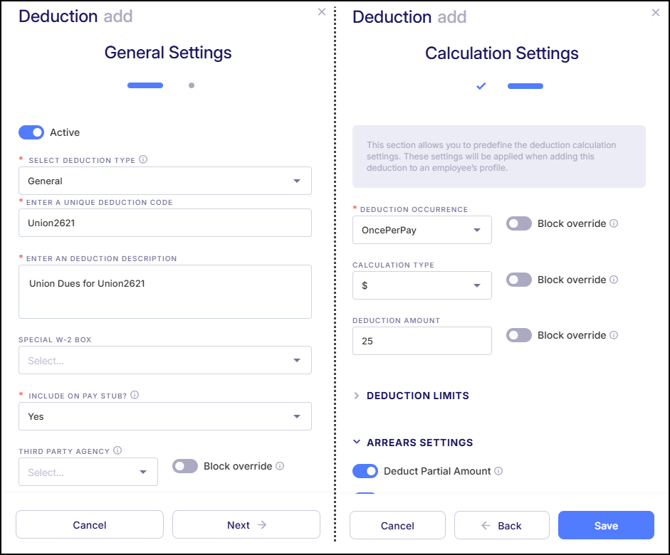
Please note that an Agency for the Union can be created to automate payments for any Union deduction if desired.
Adding Union Codes in Empeon Workforce
To set up and maintain Union Codes within Empeon Workforce, navigate to the HR section of the Company tab and select the Union Card.
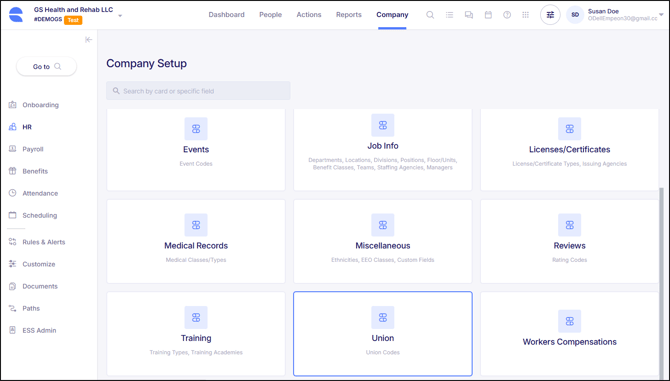
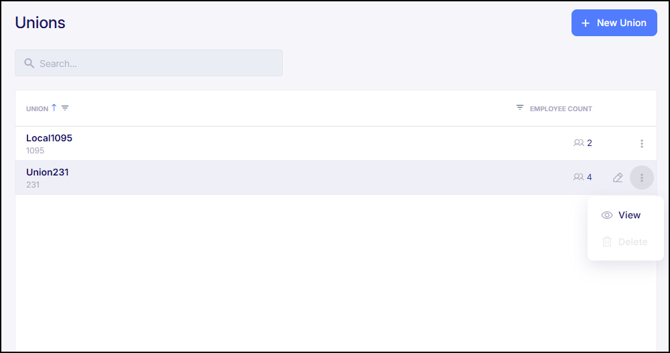
Within the Union Card, existing Union Codes can be viewed and edited. Only codes that aren't assigned to anyone can be deleted. To create a new Union Code, click on "+ New Union" in the top right corner.
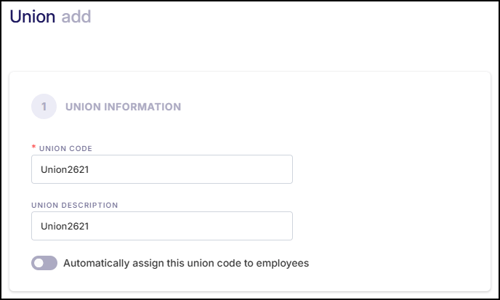
When adding a new Union Code, the configuration is broken into three sections. Please note them below and what each setting within each section does.
Union Information
- Union Code - A unique code for the union within Empeon Workforce.
- Union Description - A brief description or explanation of the union to reference.
- Automatically assign this union code to employees - When enabled, this setting automatically assigns the Union Code and any linked deduction to new employees added to the system. This setting may be useful for organizations where all employees belong to the same union.
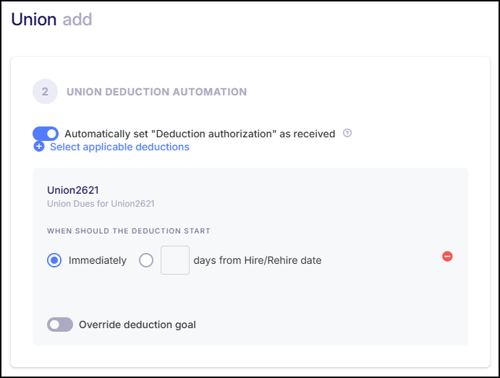
Union Deduction Automation
- Automatically set "Deduction authorization" as received - If selected, the deduction authorization will automatically be marked as received when the Union Code is added to an employee’s profile. Deductions only occur if the authorization is marked as received in the employee’s profile.
- Select applicable deductions - Choose the deduction(s) that should be linked to this Union Code. This is optional, but linking a deduction automates the creation of the employee-level union deduction. If a deduction is selected, the following two options appear:
- When should the Deduction Start? - Choose when the deduction should begin: either immediately or a specified number of days from the employee’s hire or rehire date.
- Override deduction goal - If the linked deduction has a defined deduction goal, this option allows the goal to be overridden to a different amount. A filter for employment type can be applied to have this applied toward a designated group of employees. If no filter is applied, the override applies to all employees receiving the deduction.
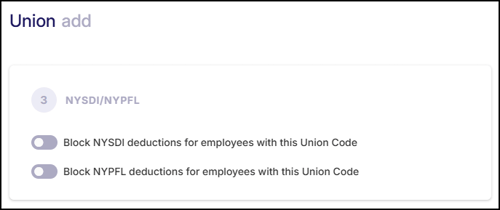
NYSDI/NYPFL
- Block NYSDI deductions for employees with this Union Code - When enabled, the New York State Disability Insurance (NYSDI) deduction will not be applied to employees assigned this Union Code.
- Block NYPFL deductions for employees with this Union Code - When enabled, the New York Paid Family Leave (NYPFL) deduction will not be applied to employees assigned this Union Code.
Please note that these settings are specific to New York State and may be required for certain unions based on their agreements or exemptions. Employers should verify the applicability of these deductions with union agreements or legal guidance.
After completing each section of the Union Code, be sure to click "Save".
Assigning Union Codes to Employees
Once a Union Code has been created, it can be assigned to employees within the Union Affiliation Card, located in the HR section of their Employee Profile. Simply click on the "Edit" button to assign the Union Code.
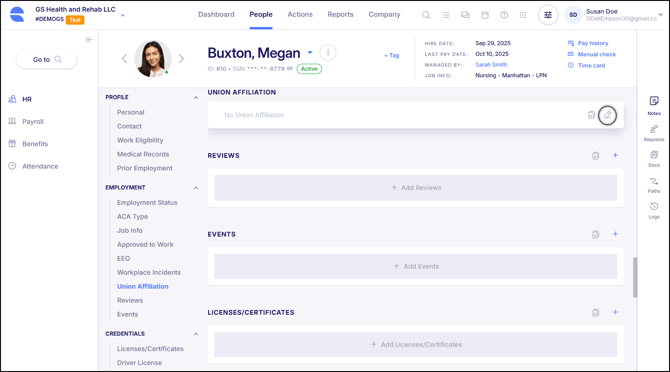
When adding a Union Code, the following fields will be prompted:
- Union - Select the appropriate Union Code for the employee.
- Date Joined - This is an optional informational field to indicate the date when the employee joined the union. This is not the hire date or the date the Union Code is being added.
- Deduction authorization received - Indicates whether the employee has authorized union deductions. Deductions will only occur if this box is checked.
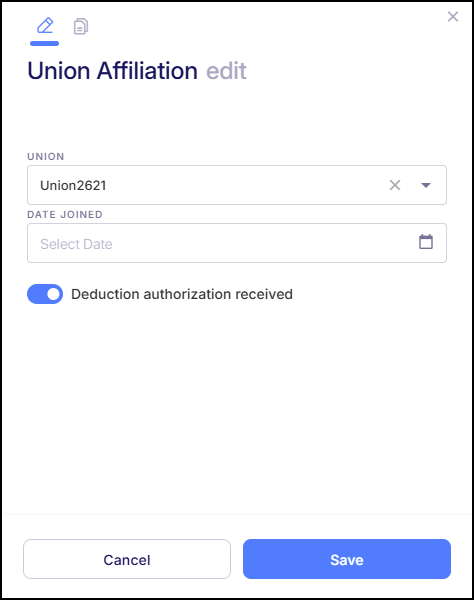
Click "Save" to finalize the Union Code assignment. If a deduction was linked to the Union Code, it will automatically be added within the Deductions Card, located within the Payroll section of the Employee Profile. Edits to this deduction can be made as needed.
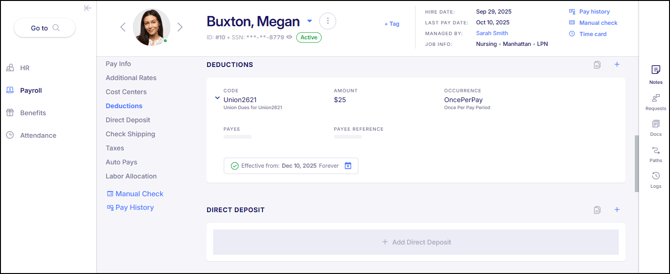
If no deduction was linked to the Union Code, this will need to be handled manually. Please refer to Empeon's article Employee Deduction Setup for assistance on this process.