
What is Pay(k)onnect?
Empeon has partnered with Pay(k)onnect to offer a direct 401(k) 360 integration, seamlessly connecting Empeon Workforce with retirement plan data. Without an integration in place, employers are responsible for manually transmitting 401(k) data after each payroll, which is a process that typically involves exporting contribution details from the payroll system, formatting the data to meet the retirement provider’s specifications, and uploading the file through the provider’s portal.

Required data in this process often includes employee identifiers, deferral amounts, employer contributions, and compensation details.
Because this process must be repeated each pay period, the responsibility for timing, accuracy, and compliance falls entirely on the employer. Errors or delays can lead to compliance issues or require corrective action. Additional tasks—such as submitting year-end census files or manually updating employee deferral changes—also remain the employer’s responsibility without an integrated solution.
This is why Empeon is excited to partner with Pay(k)onnect to offer a 401(k) integration that automates the transmission of retirement plan data helping to reduce administrative burden, minimize errors, and support timely, compliant reporting.
For more information about the integration or to begin the enrollment process, please contact Empeon Customer Support. Should you wish to enroll in this integration, please submit the 401k Feed Setup Request Form to our Customer Support team.
Pay(k)onnect FAQ's
- How long does the Implementation take?
We typically recommend a minimum of two payroll cycles for testing to ensure data accuracy before transitioning to live information. However, some 401k providers may extend this timeframe. Clients will be kept informed and included in all communications throughout the testing process.
- Who’s responsible for contributions during Implementation?
The client is responsible for ensuring that employee contributions are loaded into their accounts in a timely manner. If you have any questions or need assistance, please don't hesitate to contact your Empeon Team.
- How do I update employee’s information during testing if someone has a loan, contribution change, etc?
You can go to People > Payroll > Deductions > + button.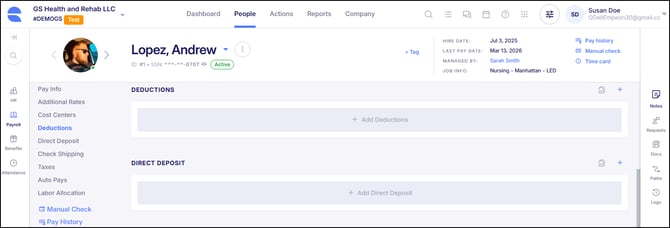
Make sure when you add the deduction you select the correct Deduction Code, Amount (either dollar or percentage) and the Frequency: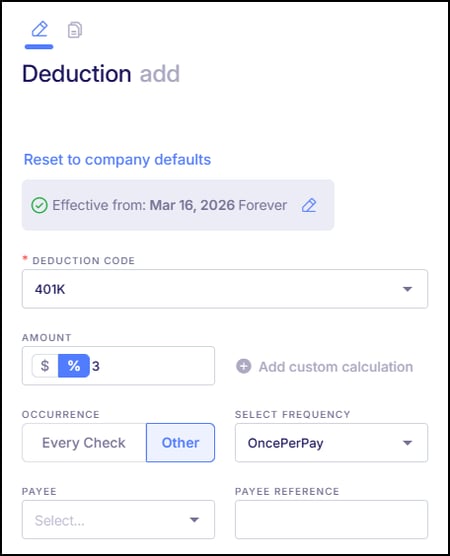
- How will I know when the testing is complete, and the files will be live?
Your retirement vendor will let the Empeon Specialist know when all aspects of the test files are in good order and they can turn the integration into production. Your Empeon Specialist will then send an email to both client and vendor the pay date of the first production file.