
What is Labor Allocation?
Labor Allocation is the process of defining how an employee’s labor costs are distributed across different areas of an organization, such as departments, locations, or other Cost Centers.
Instead of assigning all of an employee’s wages to one department or location, Labor Allocation allows organizations to split an employee’s labor expenses across multiple cost centers automatically. This helps ensure labor costs are tracked accurately for reporting, budgeting, and General Ledger purposes.
Labor Allocation is most commonly used for salaried employees or employees who do not record time through punches, as employees who record punches can allocate labor at the time of entry. Setting up Labor Allocation within an employee's profile enables the system to automatically calculate the employee’s labor distribution, eliminating the need to manually adjust allocations each pay period.
Setting Up Labor Allocation
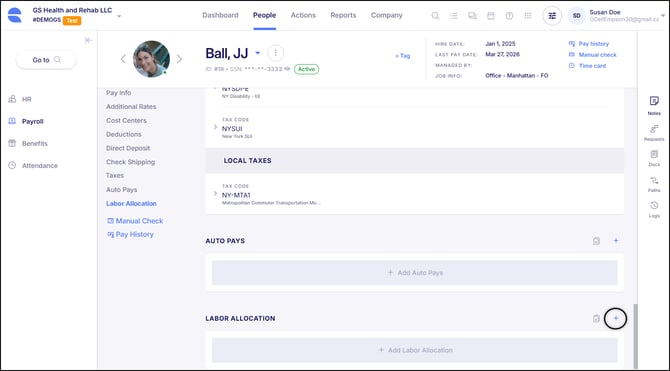
To view or set up Labor Allocation for an employee, navigate to the Payroll section of their Employee Profile, and select Labor Allocation.
Labor Allocations that have been set up will display here, offering options to Change or Edit the setup, or Delete it altogether. To add a new Labor Allocation, click the 'blue plus' button in the top right corner of the card.
When setting up Labor Allocation for an employee, each allocation includes a Percentage amount that reflects the amount of time the employee works in the Cost Center identified in the Allocated To section.
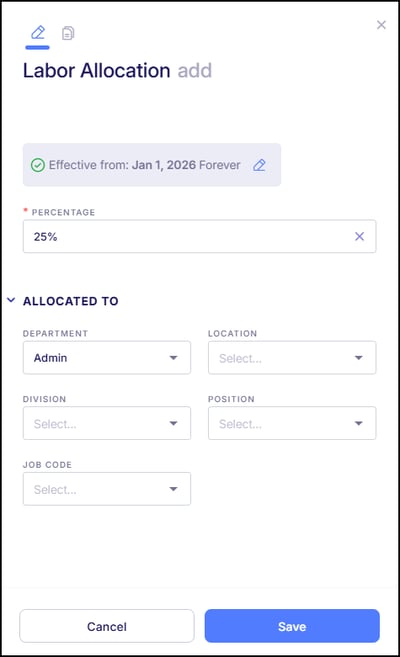
In the example above, the employee is salaried and is assigned to the "Office" department.
This Labor Allocation setup establishes that 25% of the employee’s labor is allocated toward the Admin department, with the remaining 75% allocated toward her regularly assigned Office department.
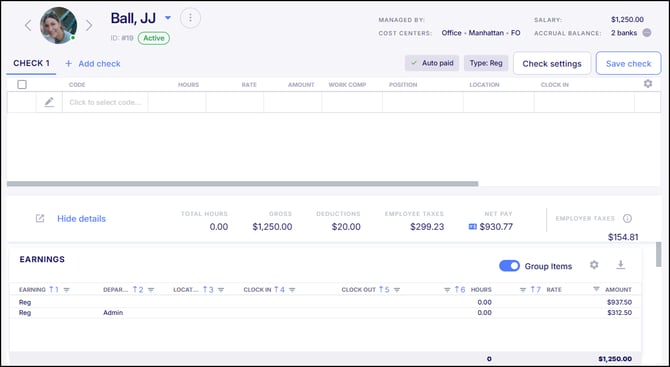
Now, when the employee is paid, the system automatically allocates 25% of the employee’s earnings toward the Admin department and the remaining 75% to her regular Office department.
Labor Distribution Reports
Two reports are available to review Labor Allocation within the system.
The Labor Distribution report provides a summarized view of labor totals by Cost Center, allowing for analysis of overall labor expenses across departments, locations, or other organizational structures.
The Live Labor Distribution report, located in the Payroll category, provides a detailed view at the employee level, displaying individual employees and their corresponding labor distribution.