
Open Shift
Employee Scheduling Requests found within Request & Approvals include a single request type: the ability for employees to request posted Shifts within Empeon's Advanced Scheduling module. Therefore, the Open Shift request is exclusive to clients enrolled in Empeon’s Advanced Scheduling feature.
The Open Shift request functions a bit differently from other requests found within Request & Approvals. Unlike other request types, it is always enabled and cannot be disabled, as the ability to post shifts and allow employees to request them through the ESS Hub is a core component of the Advanced Scheduling feature. Since this request is always enabled, the Assignee is set to Initiator by default, meaning the User who posted the Shift is responsible for reviewing and approving requests. Although this request cannot be disabled, it is registered within Request & Approvals to allow for customization of the approval workflow.
Within the ESS Hub, there is a separate tab for Open shifts within the Schedule section where employees can go to review and request Shifts that have been posted.
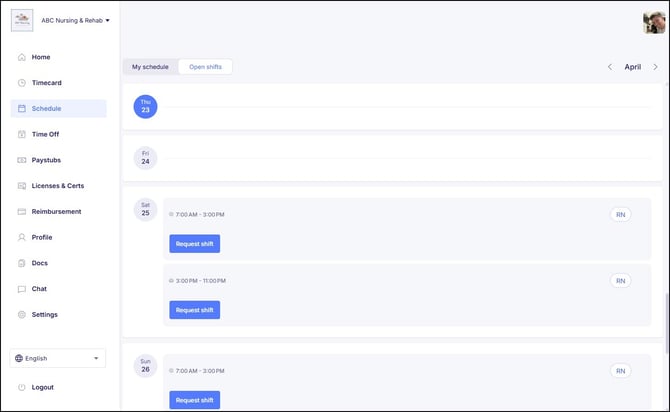
When a shift is posted, employees are notified through the following channels:
- ESS Inbox
- Text Notification (if enabled and the employee has opted in)
When employees request an open Shift, it is handled within the Shift Request Approvals section of the scheduler, separate from other request types.
Configuring Open Shift Requests
Since Open Shift requests are always enabled, configuring the request is more of a matter of editing the Assignee(s) involved in the approval workflow. To configure this request, start by clicking the "pencil" icon along the row of the request type.

From here, the ability to edit the Assignee(s) is available. There is no option to set this request to Auto-Approve.
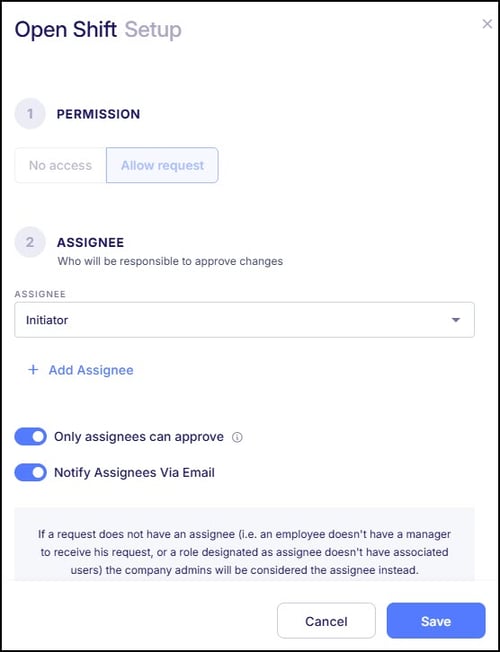
Assignees can be designated as the Initiator, a specific Role, the employee's Manager, or an individual User to review and approve the changes. Multi-step approvals can be set up to involve multiple reviewers in a defined sequence. Once the initial Assignee approves the request, it seamlessly progresses to the next assignee for further review, and so forth.
The final setting to consider when configuring this request is to establish whether "Only assignees can approve" the request. This optional setting enforces that only the designated Assignee(s) have the authority to approve the request. Please note that this restriction applies only to the custom Users and Roles assigned for approval and does not affect system-level Administrators, such as Company or Organizational Admins, who retain approval capabilities.
There is an additional setting for "Notify Assignees Via Email", which helps the Assignee(s) stay on top of Open Shift requests as they are submitted. Since these requests are often time-sensitive, a notification via email helps to ensure that requests are addressed within a timely manner.