
New Rate Change Approval Tiers
Many organizations require different levels of approval depending on the size of a pay increase. A small adjustment may only require a manager’s approval, while a larger raise may require additional executive review. With this release, rate change requests now support tiered approval routing, allowing organizations to align approval workflows with their internal compensation policies directly within Empeon Workforce.
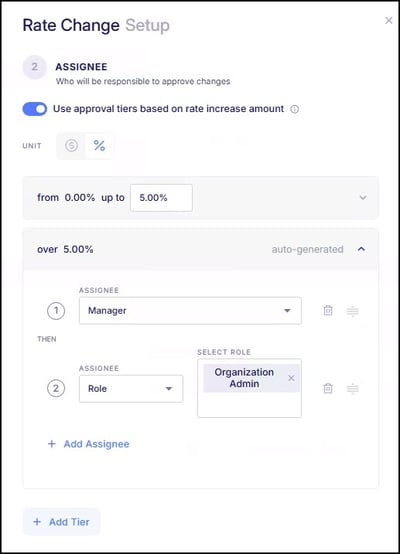
Now when configuring this request, there is a toggle within the Assignee section for "Use approval tiers based on the rate increase amount", which enables the setup of different assignees based on the rate increase being requested.
Multi-Step Approval Chains
Within each tier, admins can build sequential approval chains with multiple approval steps. Each step is reviewed in order, with a clear “Then” indicator showing the approval sequence. Making it easy to model real-world workflows where, for example, HR reviews the request first before a final executive signs off on it.
As this enhancement is rolled out, rate change requests will continue to follow their existing approval process to ensure there is no disruption to current workflows, with the option to now configure approval workflow based on the proposed rate increase amount.
Rate Request & Approval settings can be found under Company > Rules & Alerts > Request & Approval > User Requests and are available for companies with the HR Premium package.
New Live Report: Rate Change Requests
Additionally, a new Rate Change Requests report has been added to Live Reports, providing a centralized view of all rate change activity. This report includes Pending, Approved, and Denied requests, allowing users to track compensation changes, review request history, and support audit and reporting needs. Key details such as previous and new rates, effective dates, request status, and approval information are all included.
As a Live Report, this report supports standard functionality including filtering, exporting, and scheduling for ongoing monitoring and downstream use.
Enhanced Pay Details in ESS
The Pay Details view within the ESS Hub has been enhanced to provide a more detailed and structured breakdown of employee pay.
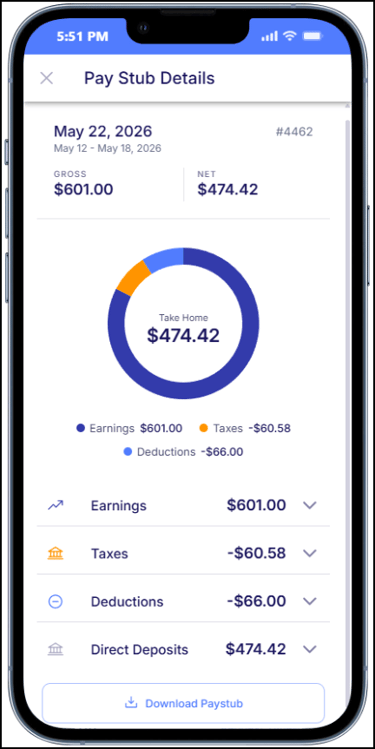
Earnings, taxes, and direct deposits are now clearly grouped and organized, making it easier for employees to understand how their pay is calculated. This includes improved visibility into hours worked, earning types, tax totals, and deposit information, with sensitive account details securely masked.`
Additional visual updates include a pay distribution chart that helps employees quickly identify their gross pay, net pay, and total taxes deducted.
New Option to Pause Onboarding
Administrators can now pause onboarding for a new hire without deleting their profile or losing any completed progress. This allows onboarding to be temporarily placed on hold while preserving the applicant’s information, completed steps, documents, and progress. While paused, the applicant will not be able to continue onboarding and will be excluded from active onboarding workflows, reminders, and automated notifications.
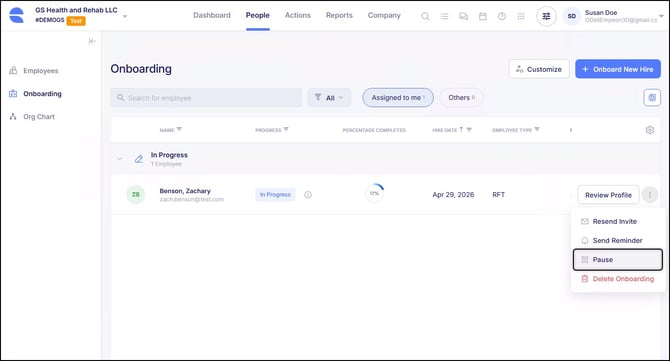
Paused Onboarding Templates will display with a Paused status within the onboarding dashboard and will be organized separately for easier visibility. Paused onboarding records can also be included in onboarding exports as needed.
When onboarding is ready to continue, administrators can select the "Resume" option to allow the employee to continue completing the Onboarding Template. The new hire will receive an email notification and will be able to continue from the step where they left off, without needing to restart the process.
This enhancement provides greater flexibility when onboarding needs to be temporarily delayed, allowing progress to be preserved until onboarding can be resumed or otherwise addressed.
Payroll Calculation Performance Improvements
Behind-the-scenes updates have been made to improve the performance of payroll calculations and audits. These updates streamline how payroll data is processed, resulting in faster calculation and audit processing times without changing existing payroll workflows or results.
As part of this update, the payroll calculation screens have been enhanced to display real-time progress, providing better visibility into calculation and audit status. The "Rescan Audits" option has also been removed, as audits are now processed in real time as part of the calculation flow.
Scheduling Performance Improvements
Behind-the-scenes updates have been made to improve performance across scheduling-related areas of the system. These updates are designed to make scheduling pages, the ESS work schedule view, and attendance preparation load more efficiently without changing how the features look or function.
Weekly and daily schedule views, ESS schedules, punch reviews, attendance processing, schedule settings, holidays, work categories, and related scheduling actions should continue to behave as before, now with improved loading times.
We’ve also added a small update to the posting and unposting shift process, particularly when working with a large number of shifts. Previously, when this action was initiated, not all selected shifts were visible. With this update, a scrollable preview of the selected shifts is displayed, showing the first 20 shifts with the ability to view additional selections as needed.
This update is part of our ongoing efforts to improve and enhance the Advanced Scheduling experience.
Improved Visibility for Shift Request Approvals
Enhancements have been made to the Shift Request Approvals screen to provide better visibility into request timing and approval status.
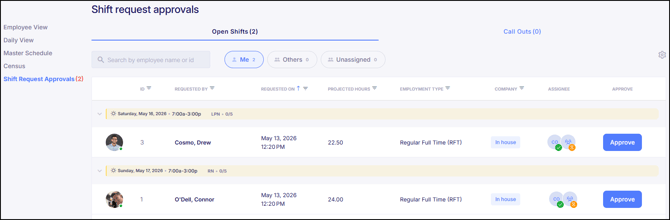
A new “Requested On” column has been added to both the Open Shifts and Call Outs tabs, allowing approvers to see when each request was submitted. The column is sortable and defaults to showing the oldest requests first.
In addition, an approval step indicator has been added to each request, providing a visual representation of the approval process. This includes indicators for completed and pending steps, along with the ability to view additional details on each step.
New Employee Category Filter in ESS Admin
A new Employee Category column has been added to the ESS Admin Portal employee list, allowing administrators to quickly identify whether a worker is an Employee or an Agency Employee.
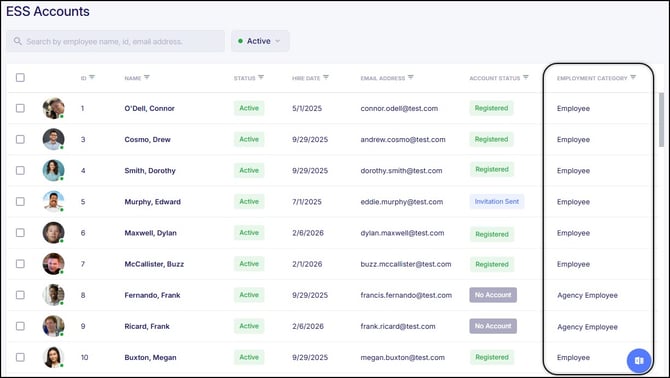
This column includes sorting and filtering capabilities, making it easier to manage ESS access, review account status, and troubleshoot registration issues.
OSHA Incident Management and Reporting Updates
Enhancements have been made to OSHA incident tracking to improve accuracy and flexibility when managing workplace incidents.
OSHA incident records now include fields to capture restricted work start and end dates, allowing organizations to track restricted duty periods in addition to days away from work. Previously, incident records only allowed one or the other to be tracked. With this update, both days away from work and restricted work periods can now be captured within the same incident record.
In addition, a new Non-recordable incident type has been added, allowing organizations to document and track incidents that do not meet OSHA recordable criteria. These incidents can be maintained for internal tracking purposes and are excluded from OSHA reports.
Allocate Approved Manual Pay Items to Cost Centers
Users can now update Cost Center allocations for approved manual pay items directly from the employee’s timecard. Previously, when manual pay items such as bonuses were added directly to the timecard, Cost Center allocations could be updated as needed. However, this functionality was not available for manual pay items that originated from approved Bonus requests.
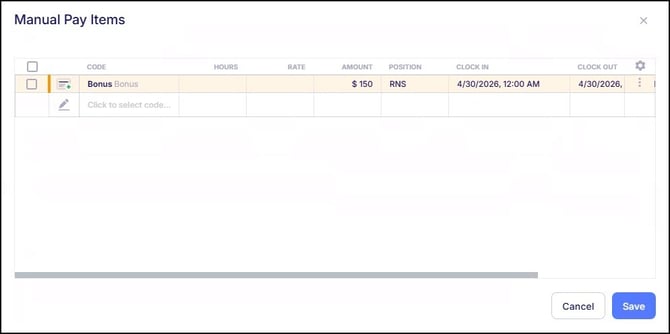
With this update, approved manual pay items can now have their Cost Center allocations updated directly from the timecard to ensure proper payroll allocation and reporting. This reduces the need for additional manual adjustments during pay entry and provides greater flexibility when allocating earnings, such as bonuses, toward specific Cost Centers.
New Show Subtotals Toggle in Pivot Table Reports
The Pivot Grid Payroll Live Report now include a “Show Subtotals” toggle within the report configuration.
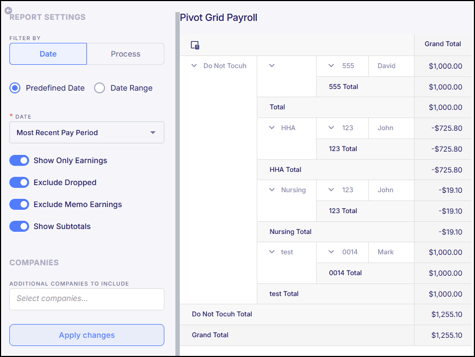
Previously, subtotals were automatically displayed for each column at the same grouping level, which could clutter the report and make it harder to read. With this update, users can turn subtotals on or off as needed, while still retaining overall totals where applicable.
I-9 Path Attachments Open in Separate Window
Attachments associated with I-9 Paths will now open in a separate window when selected, aligning the experience with how attachments are opened within onboarding. This update improves accessibility when reviewing attached I-9 documentation.
Selerix Census File Enhancement
The Selerix Census file has been updated to include additional employee data. Two new fields, Employment Type and Union Code, have been added as columns at the end of the file. This provides expanded data for integrations and downstream processing.
Bug Fixes
- Terminated Employees Able to Submit Missed Punch Requests – There were reported cases where terminated employees were still able to access ESS and submit missed punch requests. This issue has now been fixed.
- Path Duplicate Action Not Creating Copy – There were reported cases where selecting the Duplicate option for a Path opened the existing Path in edit mode instead of creating a copy. This issue has now been fixed and the Duplicate action will now create a separate copy of the selected Path as expected.
- I-9 Task Document Requirement and Visibility Issues – There were some reported cases where employees could complete the I-9 task without attaching required documents. There were also a few cases where submitted documents were not visible to users during review. This issue has now been fixed and the system now requires document attachment before submission and ensures uploaded documents are properly displayed.
- Scheduling Swap Shift Not Opening in Daily View – There were a few reported cases where selecting the Swap Shift action in the Daily View did not open the swap modal and instead prompted an error message, preventing schedulers from reassigning shifts. This issue has now been fixed.
- Shift Updates Incorrectly Tagged as Call Out in Daily View – There were reported cases where editing a shift (such as updating the floor, time, or assignment) in the Daily View incorrectly tagged the shift as a “Call out.” This also caused the shift to be misclassified in reporting. This issue has now been fixed, and updated shifts will no longer be marked as call outs.
- Future Posted Shifts Not Visible in ESS – There were a few reported cases where employees were unable to view future shifts that had been posted to ESS, resulting in an error message when attempting to access them. This issue has now been fixed, and future posted shifts will display as expected.
- E-Verify Photo Match Status Not Updating After Submission – There were reported cases where, after submitting a selection for an E-Verify photo match case, the case status did not update on screen unless the page was refreshed. This made it appear as though the case was still stuck at the photo match step. This issue has now been fixed.
- E-Verify Case Number Not Displaying on Form I-9 – There were reported cases where the E-Verify case number was not being added to the PDF version of Form I-9 after a case was opened. The system now updates the form to display the assigned E-Verify case number and this issue has now been fixed.