
Schedule Pattern Now Displays Total Hours
Total weekly hours now display for each assigned Schedule Pattern, giving users better visibility into the total hours an employee is scheduled to work.
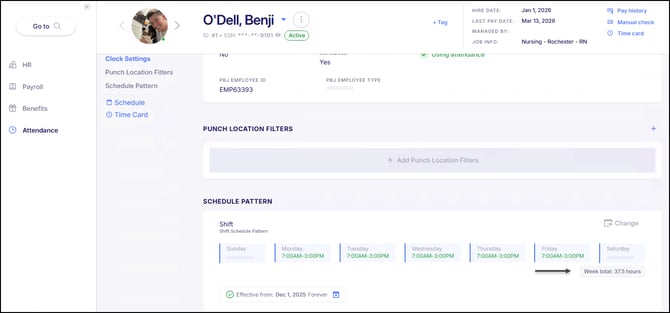
When adding a Schedule Pattern, or editing one that has already been assigned, it will also show the daily hours for each Shift that is assigned.
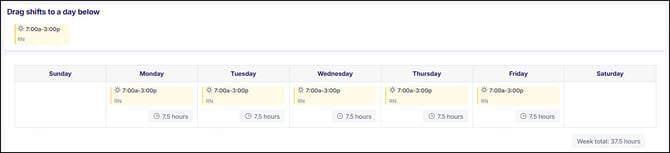
Total hours are displayed for all schedule pattern types, making it easier to review scheduled hours at a glance. The hour totals that are displayed only account for worked hours and exclude any unpaid lunches that are associated with the Shift.
Total schedule pattern hours are also now available in the Schedules And Punches standard report, as well as the Employee Schedule Patterns live report. This can also be pulled into the Employee List live report using the Column Chooser by selecting the "Weekly Total Hours" field.
Schedule Pattern Name Update
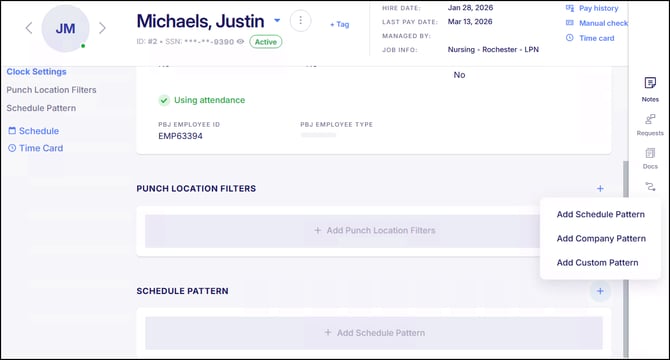
Now when adding a schedule pattern to an employee, the option previously labeled "Add Shift Pattern" has been renamed to "Add Schedule Pattern". This update improves consistency in scheduling terminology while maintaining the existing options for Company Patterns and Custom Patterns.
New Report Enhancements!
New Option to Lock Public Reports
Report creators can now lock public Standard and Live reports, preventing changes to the original configuration while still allowing others to view, run, and download them.
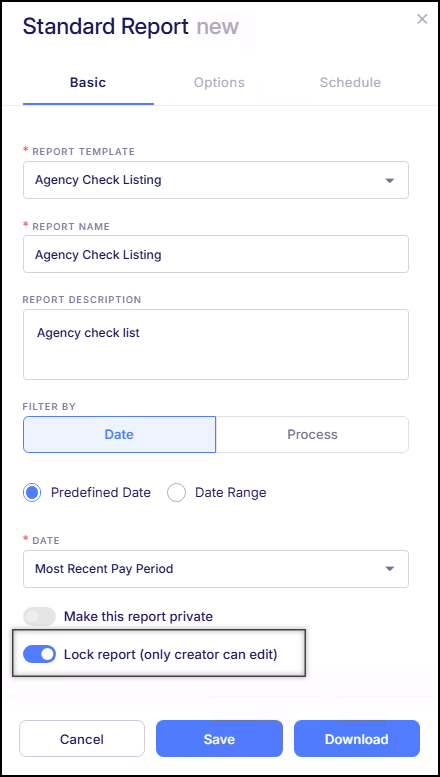
Now when creating a public report, a new Lock Report (Only creator can edit) option is available to enforce that only the report creator can make and save changes to the report. Other users will still be able to run the report, sort results, adjust date ranges, export data, and add additional companies when applicable. However, they will not be able to modify or overwrite the original report configuration. If changes are needed, users can use Save As or Clone Report to create their own copy of the report.
All locked reports will display a lock icon next to the report name to indicate that the report is locked. This enhancement helps preserve the integrity of shared reports while still allowing teams to access and reuse them as needed.
Email Delivery Option for Scheduled Reports with Multiple Companies
Email delivery is now available when scheduling Live or Standard Reports that include multiple companies. Previously, when multiple companies were selected while configuring a scheduled report, FTP was the only available delivery method. With this update, email delivery is now supported for these reports.
To ensure appropriate distribution of report data across multiple companies, the email option is limited to Organization Users and registered Email Recipients. Organization Users already have access to all companies within the organization, while Recipients may include external contacts or individuals who do not have system access. Because recipients may not have company-level permissions within the system, responsibility for ensuring the report is distributed appropriately rests with the user scheduling the report.
This enhancement provides greater flexibility in how scheduled reports are delivered while maintaining alignment with existing access and distribution practices.
Daily Time Card Report Enhancements
Improvements have been made to the Daily Time Card standard report in order to improve clarity and make the report easier to review.
Cost Centers in the Group Data section will now display both the Cost Center Code and Description, rather than only the code. This aligns the report with the format used in the Labor Distribution report and provides better context when reviewing grouped data.
Sorting behavior within cost centers has also been updated. Previously, the report was sorted by Cost Center and Punches, which could cause employees without punches to appear at the end of the group. The report will now sort by Cost Center and then alphabetically by employee, ensuring employees are listed consistently regardless of how many punches they have recorded.
These updates make the report easier to read and help ensure employee records appear in a predictable and logical order within each cost center.
Custom Transaction Live Report Enhancements
The Custom Transaction Live Report has been enhanced to include additional pay history fields, providing greater visibility into paycheck-level data.
Users can now add fields such as Batch, Check Date, Check Number, Gross, Net, and Paycheck Date ranges when configuring the report. When these fields are selected, the report will automatically adjust how results are grouped, allowing data to be viewed at either the employee level or the paycheck level.
These enhancements provide greater flexibility when building reports and make the Custom Transaction Live Report more useful for payroll reconciliation, auditing, and detailed payroll analysis.
New Path Enhancements!
New Path Tasks for W-4 & I-9 Forms
New Path tasks have been added for Form W-4 and Form I-9, allowing existing employees to complete these forms outside of the onboarding process. This enhancement supports scenarios such as business acquisitions or transitions to a new EIN, where employee data may be uploaded in bulk but updated compliance forms are still required.
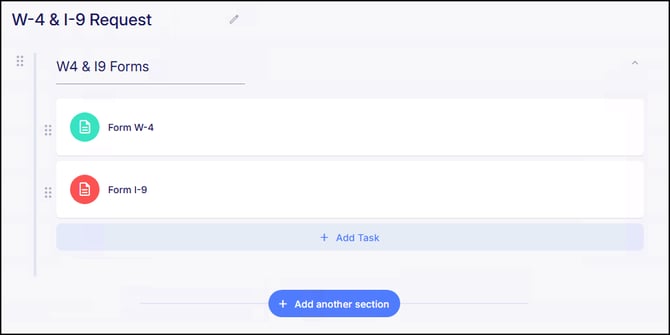
With this update, administrators can configure a Path that includes these tasks in order to collect the required forms from existing employees without initiating a full onboarding workflow. A Path with these tasks should not be included in Onboarding Templates sent to new hires, since options to include the W-4 and I-9 forms are already available within the standard onboarding process. This enhancement helps streamline organizational transitions while ensuring required employment documentation is collected and maintained.
Please note that if Tax requests are enabled in Requests & Approvals, completed Form W-4 tasks will be submitted as Pending and follow the same approval workflow as tax change requests.
If the Tax request is not enabled, the task will be submitted as Completed, and the employee’s tax information will automatically populate within their profile.
New Filtering Options When Sharing Paths
When sharing Paths, users now have more flexibility in selecting recipients. Users can now apply Filter Groups when determining which employees should receive a Path and can also manually include or exclude specific employees by selecting them individually.
This enhancement provides greater control when distributing Paths, helping ensure tasks and training are assigned to the appropriate employees.
New Option to Deactivate Onboarding Templates
Users can now mark Onboarding Templates as Inactive when they are no longer needed. Deactivating a template preserves its record within the system but removes it from being selected when onboarding a new hire. If an onboarding template has already been sent and is still in progress when it is deactivated, the employee will still be able to complete the onboarding process.
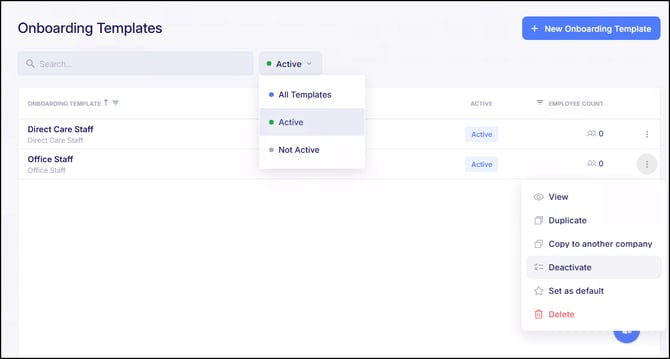
Onboarding Templates can also be reactivated at any time if they need to be used again. The Onboarding Templates page now displays a status indicator showing whether each template is Active or Inactive, making it easier to identify which templates are currently available for use.
Organization Users Can Now Generate API Credentials
All Organization Users can now generate and regenerate API credentials within the Organization Portal. Previously, this capability was limited to Organization Admins and Organization Owners. With this update, all Organizational Roles are now able to manage API credentials directly, providing greater flexibility when setting up or maintaining integrations.
Increased Character Limit for Addresses
The character limit for address fields across the system has been increased from 30 characters to 100 characters. Previously, longer addresses could exceed the field limit and require abbreviation or adjustment during entry. With this update, the expanded limit allows full address details to be entered more easily, reducing entry errors and improving data accuracy.
E-Verify Alien Registration Number Formatting
The system will now automatically format the Alien Registration Number when submitting E-Verify cases. If the number is entered using digits only, the system will automatically add the required leading “A” to ensure the value is submitted in the correct format.
This update helps prevent formatting errors during E-Verify submissions and ensures the registration number meets the expected requirements.
Bug Fixes
- Payroll Preprocess Column Customization Options Removed – There were reported instances where the Payroll Preprocess screen displayed options to rename or add static columns, but would not apply when the report was export as an Excel or CSV file. Since this functionality is not supported for this screen, these customization options have been removed.
- Onboarding “Paid As” Field Not Clickable – There were reported cases where the Paid As field within the Admin Input section of a submitted onboarding template could not be selected during the review process. This prevented administrators from updating or confirming how the employee should be paid. This issue has now been fixed.
- License and Certificate Updates Not Immediately Displaying – There were some reported cases where updates made to Licenses and Certificates did not immediately appear after saving. In these instances, users needed to refresh the screen before the changes were visible. This issue has now been fixed.
- PTO Approvers Unable to View Request Details – There were some reported cases where users with permission to approve PTO requests were unable to view the request details before approving them. Approvers should always be able to review request details regardless of other permissions. This issue has now been fixed.
- Duplicate Payroll Adjustments from Reopened Timecards – There were reported cases where reopening a closed timecard and making adjustments before attendance records were imported to payroll could result in the same changes being sent to payroll more than once. This could occur when the adjustment appeared in Timecard Adjustments and was also included when attendance records were later applied to payroll. Safeguards have been added to prevent actions that could result in duplicate payroll adjustments and this issue has now been fixed.
- Open Shift Report Error – There were reported cases where running the Open Shift standard report resulted in an error message stating “Input string was not in a correct format.” This prevented the report from generating as expected. This issue has now been fixed.
- Overtime Premium Rounding Issue on W-2c Forms – There were some instances where overtime premiums calculated using the Flat Overtime method were stored with more than two decimal places, which caused inconsistencies when generating W-2c forms. This issue has been corrected so overtime premiums are properly rounded and reported.
- YE Dashboard Requiring OT Configuration for Prior Years – There were some reported cases where the Year-End Dashboard required completion of the Overtime Tax Deduction configuration in order to access or print W-2s for 2024 and prior years. This requirement was only intended for the newer overtime tax deduction feature and should not have applied to earlier calendar years. The system has been updated so the overtime configuration is no longer required for prior-year W-2 access.